Win 12 Launcher
Version: 6.1
13.58MB
4.2
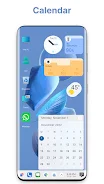
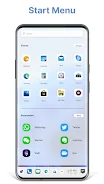
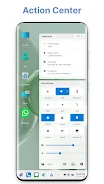
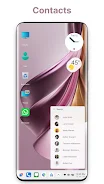
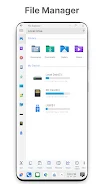
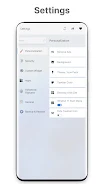
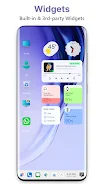
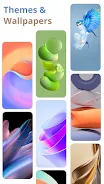
Win 12 Launcher brings a desktop-style Start Menu, taskbar and resizable tiles to Android devices while preserving core system behavior; Win 12 Launcher is designed to give your phone or tablet a familiar PC-like workspace and includes a native file explorer, Action Center and theme options so you can tailor a coherent, productive home screen experience.
This launcher recreates a compact desktop metaphor on mobile: a Start Menu for organized app access, a persistent taskbar for pinned and running apps, and a grid of resizable tiles that highlights frequently used tools. The integrated File Explorer provides local file management with folder operations, ZIP and RAR handling, and visibility of both internal storage and removable SD cards so common file tasks are simple. An Action Center consolidates notifications and system toggles so you can change settings or view alerts without opening separate apps. These features combine to make navigation and multitasking more deliberate and efficient while leaving Android’s underlying behavior intact.
Interaction relies on widely used touch gestures adapted for a desktop layout: tap to launch apps and open menus, long-press to move or delete icons, drag icons to the taskbar to pin them, and use pinch or drag gestures on tiles to resize where supported. The Start Menu opens from the home button or a configurable corner and can be navigated by touch or a directional pad on Android TV devices. Context menus and long-press previews expose app-specific shortcuts, and the launcher respects system navigation and accessibility gestures so users keep familiar controls. Where Android supports hardware input, mouse pointers and keyboards are handled in the system’s standard way so the launcher remains usable with external input devices.
Customization emphasizes clarity and practical layout choices: change themes, adjust tile sizes, swap icon packs, and arrange which widgets appear on the desktop or in the Action Center. Themes modify colors, icon backgrounds and transparency to match your aesthetic, while photo tiles can cycle personal images for a customized touch. Live wallpapers are supported with conservative motion settings to avoid overwhelming readability. Together these options let you create a workspace that looks contemporary, maintains legibility on different screens, and supports a consistent visual hierarchy for faster app recognition.
Setting up the launcher is straightforward, and there is a natural progression as you personalize layout and shortcuts: begin by pinning your most-used apps to the taskbar and creating categorized Start Menu folders, then refine tile sizes and widget placements to minimize taps and screen switching. Quick shortcuts and app folders reduce time spent hunting for tools, and deeper Start Menu organization helps you adapt the workspace to specific tasks. Some advanced conveniences — such as granular Start Menu editing, expanded theme packs, or additional customization presets — are available through an optional paid upgrade; core file management, tile resizing and network sharing remain available in the free version so you can evaluate functionality before choosing extras.
The built-in File Explorer focuses on local and local-network use: browse internal and SD storage, create folders, move or copy files, compress into ZIP archives and extract popular formats. Network sharing works over Wi‑Fi, FTP and LAN connections to transfer files to nearby computers without relying on cloud services. The launcher, widgets and file browser are fully functional offline for everyday use, and network features activate only when you intentionally use them, keeping background data use minimal and predictable.
Accessibility features include adjustable text and icon sizes, high-contrast theme options and compatibility with Android’s TalkBack and system accessibility services so users who rely on assistive technologies can navigate the desktop-style interface. Win 12 Launcher is optimized for phones, tablets and Android TV with layout adjustments for larger screens and remote-control navigation on TV devices. The codebase aims for a lightweight footprint and smooth transitions so performance stays responsive across a range of hardware, and the launcher tolerates heavy app loads by prioritizing straightforward animations and predictable background behavior.
Beyond initial setup, the main appeal is iterative refinement: users often return to tweak layouts, try new themes, and reorganize tiles as habits change, which provides long-term value without forced gamification. The interface supports focused workflows for productivity tasks, clearer app organization for daily routines, and practical file tools for device maintenance. Because Win 12 Launcher keeps Android fundamentals visible and accessible, it fits as a productivity layer rather than a replacement, offering a familiar desktop feeling while remaining respectful of the underlying operating system.