Wakey - The Cutest Alarm Clock
Version: 3.2 - Andromeda - Bu
39.40MB
4.5


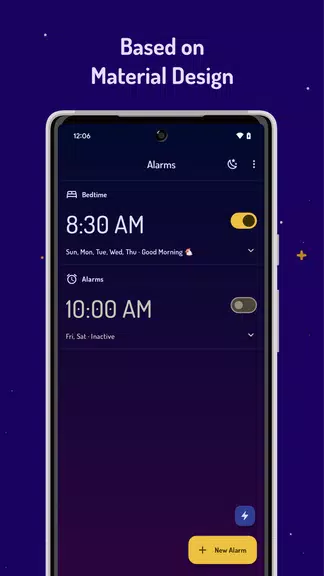
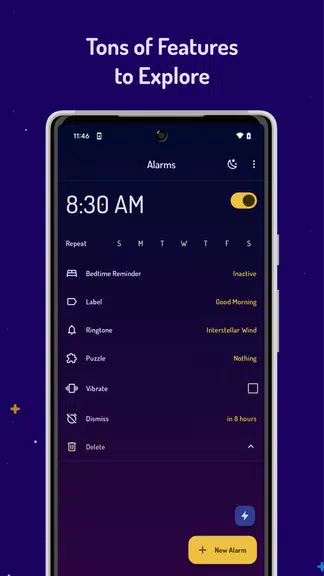
Wakey - The Cutest Alarm Clock is a playful, reliable alarm app designed to make mornings less stressful and more pleasant by combining practical wake-up tools with friendly characters and gentle audio cues. The interface puts time and controls front and center so you can create and edit alarms quickly, and the app balances simple operation with enough personalization to fit different lifestyles.
This app focuses on small, thoughtful details that change how you start the day rather than adding complex features you won’t use. Alarms support single occurrences and recurring patterns for weekdays, weekends, or any custom schedule you need. Visual feedback from soft illustrations and mascots helps orient you when an alarm sounds, and gradual volume ramps and layered audio options reduce the shock of abrupt alerts.
Setting an alarm in Wakey is intentionally low-friction: choose a time, repeat rule, and sound in a few taps. Large tappable areas, clear labels for repeat and sound settings, and straightforward confirmation controls keep setup fast on phones and tablets. When alarms go off you can use simple gestures or one-tap dismiss and snooze options; haptic feedback and brief animations communicate state changes so you always know whether an alarm was snoozed or dismissed.
Wakey - The Cutest Alarm Clock offers flexible personalization without overwhelming you. Assign different sounds or sound layers to specific days, color-code alarms for priorities, and adjust animation intensity and volume curves to suit sensitivity. You can mix ambient background tracks with higher-energy chimes to create a layered wake-up soundtrack, and save templates for common routines so you don’t have to recreate the same setup each week.
Alarms are engineered to be lightweight and reliable even when the app runs in the background or the device enters battery-saving modes. The app works offline for all core functions: alarm scheduling, sound playback, and local timers do not require a network connection. On some devices you may need to review battery optimization or permission prompts; Wakey includes in-app guidance for common manufacturer restrictions to help alarms fire consistently.
Beyond alarms, Wakey includes a straightforward timer and stopwatch for short tasks and workout intervals, and quick links to your calendar so you can align alarms with meetings or travel plans. Notifications are concise and actionable, allowing you to snooze or dismiss without opening the full app, and the app keeps settings accessible so adjustments are fast when your day changes.
The design emphasizes clarity and inclusive use: high-contrast mode, scalable text, and clear iconography help users with different needs. Animations are subtle and can be reduced for users who prefer minimal motion. Audio accessibility is supported through volume control and haptic cues, and the app’s layout favors predictable navigation so people who rely on assistive technologies can find controls reliably.
Save time by pre-configuring weekday and weekend templates and naming them for quick selection. Use layered sounds—pair a soft ambient track with a gentle chime—to create a more natural wake-up progression. Enable gradual volume so alerts build up instead of starting loudly, and assign color codes to distinguish critical alarms from routine reminders. Periodically review battery optimization settings on your device to keep alarms consistent.
Wakey suits people who prefer a friendly, approachable alarm experience rather than a stark utility clock. It’s well suited to students, remote workers, parents who share devices, and anyone who wants to add personality to a functional morning routine while retaining dependable scheduling and notification behavior. The balance of ease-of-use and customization makes it useful for casual users and those who like to fine-tune their wake-up environment.
Install from your preferred app source, grant the minimal permissions needed for notifications and background operation, and create your first alarm within a minute. The app will prompt you when it detects manufacturer-specific battery restrictions and explain how to allow persistent scheduling so alarms trigger reliably. Regularly back up your templates if you change devices often.
Wakey - The Cutest Alarm Clock keeps essentials close while adding character to routine wake-ups, offering a thoughtful feature set, clear interface, and practical personalization so mornings can feel less mechanical and more manageable.