Simple Keyboard
Version: 5.4.8
18.00MB
4.4




If you're the kind of user who values a fast, private typing tool, Simple Keyboard aims to deliver a no-frills input experience that stays out of your way. This lightweight Android keyboard focuses on core typing tasks: fast text entry, multiple language layouts, and a straightforward interface that looks modern while staying small and efficient. If privacy matters, you can rely on a keyboard that refuses internet access, removes ads and unnecessary permissions, and offers customization so the keys feel familiar and comfortable.
Enable and set as default: After installation, open your device settings and activate Simple Keyboard from the list of input methods, then choose it as the default. The process is the same as other keyboards and usually takes less than a minute.
Select language and layout: Pick from several supported languages and keyboard layouts to match your typing habit, whether you prefer compact layouts or a full QWERTY with numbers. Language switching is immediate and lightweight.
Create and pin clips for reuse: Use the built-in clips feature to store frequent phrases like email signatures or common replies, then pin the most-used snippets for fast access while chatting or composing messages.
Practical scenarios: On short errands you can type a quick shopping list offline, or during a busy commute craft a brief message without sending any data to remote servers.
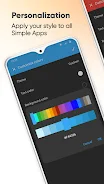
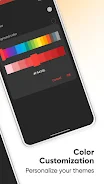
Customize look and feel: Change theme colors and enable the dark theme for low-light typing; adjustments are simple and help the keyboard blend with your device style.
No network access: The app deliberately avoids internet permission so your keystrokes stay local, increasing privacy and reducing background data usage compared with internet-enabled keyboards.
Lightweight and performant: Simple Keyboard takes up minimal storage and runs smoothly on older phones or devices with limited resources, delivering responsive keypresses and low latency.
Material design and dark theme: A modern look with readable keys and a built-in dark option makes typing comfortable both day and night without extra theme downloads.
Customizable colors: You can tweak color accents to match your taste or accessibility needs, making the keyboard visually clearer without extra bloat.
Clips and frequently used items: Save snippets for repetitive text and pin important ones so you can paste them instantly when composing emails, messages, or form inputs.
Emoji support: A broad emoji set is included so you can express reactions without switching to a separate app or online service.
Open source and ad free: The project is open source, which makes its code visible to the community, and the app does not display ads or ask for unnecessary permissions.
Simple Keyboard is a tidy, privacy-focused input option for Android users who want speed and control without extra services or ads; give it a try if you prefer a minimal, customizable keyboard and value keeping your typing local on the device.