
Background Eraser
Version: 4.3.0
240.70MB
4.5
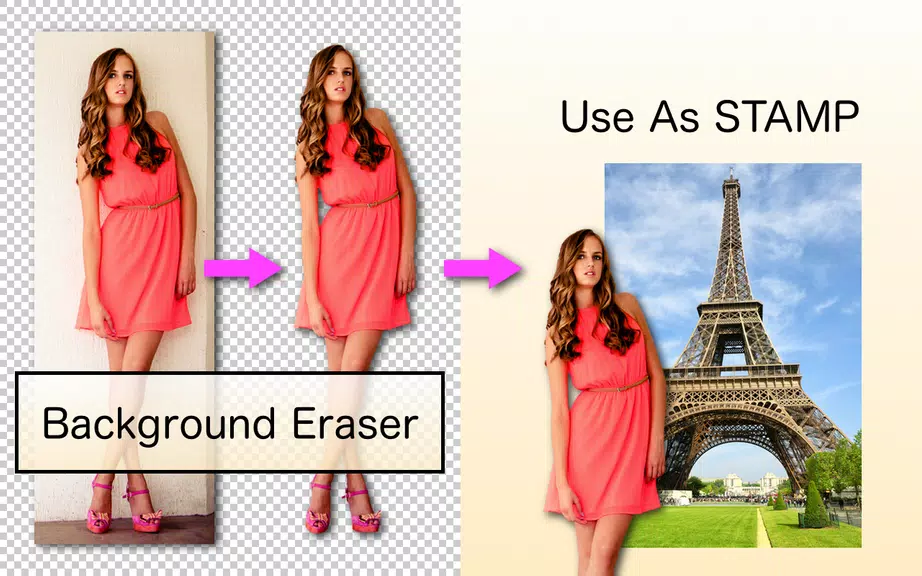
Background Eraser is a lightweight photo utility that removes backgrounds quickly and accurately, letting you create transparent PNGs or swap in new scenes with a few taps. Background Eraser streamlines object selection, automatic cutouts, and manual refinement for clean, professional-looking results on Android devices.
Background Eraser focuses on fast background removal without a steep learning curve. The app combines automatic AI-assisted detection with precision tools so you can delete or replace backgrounds for social posts, product photos, and creative composites. Users can export images with transparent backgrounds for use in other editing apps or directly share them to social media.
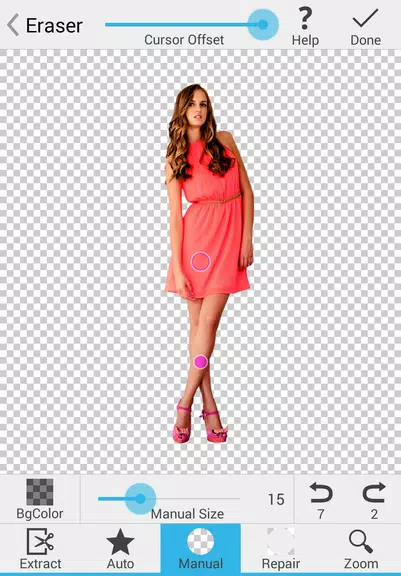
Using Background Eraser follows a simple, predictable workflow: import an image, run the automatic cutout, refine edges with manual brushes, and save or replace the background. The interface places key controls within thumb reach, minimizing tool hunting and keeping the focus on precise editing. Templates and presets accelerate common tasks, such as preparing product shots for online stores.
Photographers, sellers, and content creators will find Background Eraser useful for generating clean assets quickly. Remove distracting backgrounds from portraits, isolate products for catalog images, or create layered visuals for promotional posts. The app is also handy for hobbyists composing collages or mockups for moodboards and presentations.
Background Eraser is optimized for a wide range of Android hardware. On modern devices it performs automatic removal in seconds, while older devices may take slightly longer depending on image resolution. The app supports common image sizes and keeps memory use reasonable by offering an option to work at reduced resolution before committing final edits.
The interface balances a clean, modern layout with essential controls visible at all times. Tool icons are intuitive and labeled, and contextual help appears when a feature is used for the first time. Background Eraser keeps tool latency low, and brush responsiveness feels natural for detailed adjustments.
Once a background is removed, Background Eraser lets you save files locally, upload them to cloud storage, or share directly to messaging and social platforms. The app produces transparent PNGs that integrate smoothly with image editors and design tools, enabling end-to-end workflows for content professionals.
To begin, open Background Eraser and import a photo from your gallery. Tap the auto button to let the app do the initial selection, then switch to the manual brushes to tidy up edges. Save your result as a PNG for transparent backgrounds, or choose a replacement background from the built-in library. Regular use will make the process feel faster and more precise.
Background Eraser delivers a focused set of capabilities for people who need clean subject cutouts without the complexity of desktop software. With automatic detection, robust manual controls, and straightforward export options, the app is a practical tool for creators who want polished images quickly and efficiently.