Declutter – Gallery Cleaner
Version: 1.0.7
5.00MB
4.5




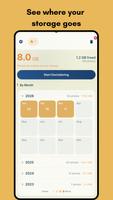



Declutter – Gallery Cleaner helps reclaim storage and organize photos quickly with intelligent tools that detect duplicates, similar shots, and large files. The app simplifies gallery maintenance through clear actions, batch operations, and a preview-first approach to avoid accidental deletes while improving device performance and freeing space.
Declutter – Gallery Cleaner brings a focused set of tools designed for people who want a tidy, fast gallery without spending hours managing files. The interface prioritizes clarity: thumbnails load quickly, suggested deletions are grouped logically, and a history log keeps accidental changes reversible for a limited time.
Once installed, the app scans gallery folders and indexes media without altering files. Scans are optimized to run in the background and pause when battery or system load is high. After scanning, results are presented in categories such as duplicates, similar photos, screenshots, and large files. You can review each category, adjust sensitivity settings, and apply cleanup actions selectively.
The design focuses on quick decisions. A simple toolbar sorts results by date, size, or similarity score. Thumbnail stacks show grouped images so you can swipe through the best shot and mark others for removal. For users who prefer manual control, manual selection tools let you pick and choose across folders with minimal taps.
Declutter – Gallery Cleaner includes automation features to reduce repetitive tasks. Smart mode offers a recommended selection based on image quality and recency, while scheduled scans can run weekly to surface new candidates. There is also a favorites filter that never suggests items you tagged as important, ensuring the app respects your personal choices.
The app is built to work on a wide range of Android devices. Memory usage is minimized by streaming thumbnails and caching only essential metadata. Scans are incremental after the initial run, so subsequent cleanups are quicker. Declutter supports common gallery formats including JPEG, PNG, GIF, HEIC, and major video codecs, and it plays nicely with cloud-synced folders by showing file locations and upload statuses.
Privacy is handled through on-device analysis: no image content is uploaded to external servers for routine scanning. Deleted items are moved to a temporary recycle bin inside the app so you can restore anything removed by mistake within a preset time window. The app also offers clear permissions prompts and a settings page where you can restrict which folders are scanned.
Getting going is straightforward: grant gallery access, allow an initial scan, and choose from suggested cleanups or review results manually. Declutter – Gallery Cleaner is intended for users who want an efficient, low-friction way to organize media, recover storage, and maintain a clutter-free gallery without losing control over their files.