JET Crew
Version: 1.0.2
16.00MB
4
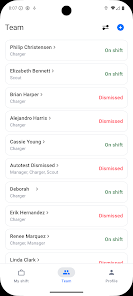
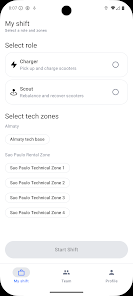
JET Crew is the internal mobile application built for GO JET service team members, providing a company-controlled interface that centralizes operational tools and secure communications for staff whose accounts are provisioned by an administrator rather than through public sign-up. JET Crew is intended for employees and contractors working in the field or on-site, offering a compact, efficient utility that installs quickly and minimizes storage and data impact on modern Android devices.
JET Crew delivers administrator-managed account access and role-based controls, so only authorized personnel can view schedules, tasks, documents, and messages assigned to their organization. The app bundles core capabilities commonly needed by service teams: structured task entries and checklists, in-app messaging for crew coordination, access to organization-approved documents and reference materials, and clear status indicators to track job progress. The package is intentionally small at around 16 MB and targets Android 8.0 and up to keep installation and updates lightweight for field devices.
The application emphasizes predictable, repeatable workflows that mirror real-world procedures. Tasks are presented as discrete jobs or checklists that a user can open, complete, and sign off on; required fields and validation steps reduce errors and keep records consistent. Jobs can be grouped by shift or operational area to help users focus on the work assigned to them. Each completed task includes a timestamp and basic audit details so administrators can review activity history without exposing sensitive information to the public.
Controls are tuned for practical, touch-first use on Android devices with simple, clear buttons and form inputs designed for quick completion in field conditions. Navigation uses familiar Android patterns so staff can learn the app quickly: clear menus, sequential screens for multi-step procedures, and large tap targets to improve usability when users are on the move. Error messages and inline guidance are provided to reduce rework and speed task completion.
Onboarding is managed by an administrator, not by self-registration, enabling organizations to provision accounts and assign role-specific access. This model supports progressive responsibility: new users receive the core set of capabilities they need, while supervisors or specialized technicians receive additional modules and permissions. Built-in guidance and contextual help aim to shorten ramp-up time and ensure consistent execution of operational procedures.
The visual approach is utilitarian and focused on legibility: high-contrast text, clear typography, and a layout that prioritizes essential information. Administrators can align the app with company branding and choose which modules are visible to different teams. Users can adjust basic presentation options such as text size to match personal preferences or accessibility needs without changing core functionality.
JET Crew is designed for environments with intermittent connectivity by allowing users to record data and complete checklists offline and queue changes for secure synchronization when a connection becomes available. This approach reduces disruptions to field work and ensures that data captured during the working day is preserved and transmitted to central systems once connectivity is restored.
The app enforces validation rules and required fields to maintain data quality and to limit common mistakes in operational reporting. When entries fail validation, clear feedback points users to the required corrections. This lightweight challenge system is focused on ensuring accurate records rather than gamified scores, supporting compliance and reliable handoffs between shifts.
Accessibility considerations include scalable text and screen-reader compatibility to support diverse users. Security is organization-centric: account provisioning is handled by administrators and the app is distributed through company-controlled channels. Communications and stored entries are intended for internal use only and are protected through standard device and backend controls managed by the employer.
The app requires Android 8.0 or later and is not optimized for older devices. JET Crew does not permit self-registration and is therefore unsuitable for the general public; distribution and functionality assume a managed, organizational deployment. Because of these constraints, availability is restricted to accounts registered and approved by a company administrator.
Offered by JETSHR LTDA, JET Crew is listed as Version 1.0.2 with a release date of Apr 30, 2026 and an update on May 4, 2026. The public listing indicates a content rating of Rated for 3+ and reflects a controlled deployment model rather than broad consumer distribution. The small package size and focused feature set make JET Crew a practical choice for companies that need a centrally managed, lightweight mobile tool for operations.