TimeWise
Version: 2.16
52.28MB
4
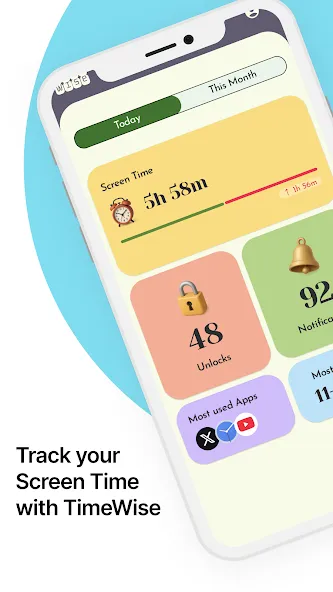
TimeWise is an all-in-one productivity app for Android that helps you organize tasks, monitor screen time and take control of daily routines. TimeWise puts task management, a unified calendar view and habit tracking into a single, approachable interface so you can see where your time goes and make steady improvements. The app is designed for people who want clear, visual reports about app usage, unlock frequency and notification load while also having practical tools to plan days and form better habits.
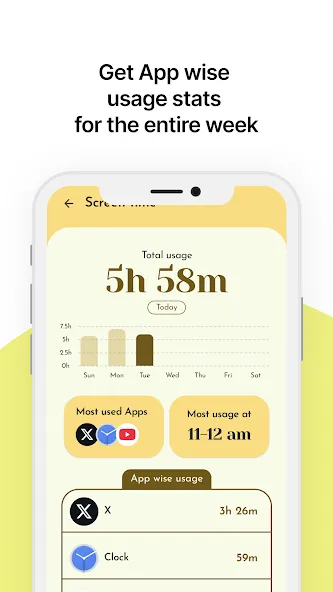
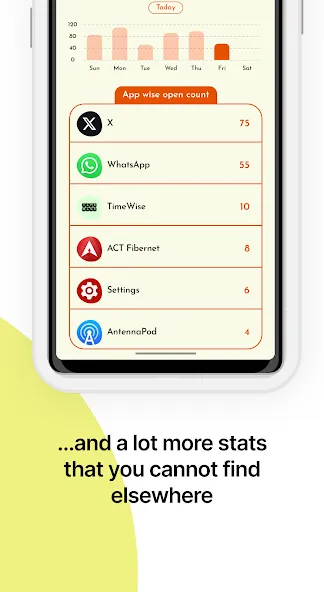
TimeWise offers detailed screen time reports with daily and weekly breakdowns that show total hours and trends over time, helping you spot recurring patterns. The unlock counter records how often you pick up your device so you can identify compulsive checking behaviors and set realistic reduction goals. A notification tracker tallies interruptions per app so you can prioritize which notifications to mute or limit. The built-in calendar and task manager let you create, schedule and categorize tasks alongside events, giving a single timeline for planning. Customization options include multiple themes, layout choices and fine-grained notification settings so the interface fits your workflow. Usage rankings highlight your top apps by time and provide totals, with an option to include system-time for a complete picture.
The controls in TimeWise are intentionally simple: tap to open a detailed view, swipe between day, week and month timelines, and long-press items to access quick-edit options. Creating tasks is a matter of a few taps, with drag-and-drop reordering in lists and calendar entries. Reports are interactive — tapping a chart segment filters the list below so you can trace an hour of activity back to specific apps or tasks. TimeWise integrates with Android calendar services for two-way visibility of events I and supports local reminders that work even when your device is offline.
Rather than gamified rewards, TimeWise focuses on measurable progression: set daily or weekly goals for screen time, unlock frequency or task completion and watch your trend lines improve. Streak tracking and milestone markers help you notice progress and maintain momentum, while weekly summaries show whether you met targets and identify areas to adjust. The app includes optional challenge modes that let you try focused periods with reduced notifications and locked app timers to test concentration without introducing competitive leaderboards or online ranking.
TimeWise uses a clean, minimalist visual style with clear typography and high-contrast charts that are easy to read at a glance. Choose color themes to match your preference or switch to a compact layout for smaller screens. Calendar and task views can be toggled between list and grid formats, and widget support allows you to pin upcoming tasks and a quick summary of today’s screen time to your home screen. Custom notification rules let you allow or defer alerts during focus windows so the visual environment matches your attention strategy.
Replay value comes from habitual use and ongoing reflection: check-ins each morning and evening, weekly reviews and periodic adjustments to goals keep the app useful day after day. Because TimeWise stores local history and presents trends, returning users benefit from cumulative insights instead of one-off reports. The app encourages regular micro-adjustments to routines, making it more valuable the longer you maintain it.
Accessibility is considered in layout and font scaling, with support for larger text sizes, high-contrast themes and compatibility with Android accessibility services. TimeWise works reliably without an internet connection for core features like task lists, local reminders and recorded usage events, so your schedule and basic analytics remain available while offline. Data stays on-device unless you explicitly choose to export or sync through supported calendar integrations.
Users will appreciate TimeWise for its intuitive interface, battery-efficient background monitoring and the depth of its local analytics. Calendar integration and customization help it fit into existing workflows, and offline functionality ensures dependable access. Some advanced analytics and export features are part of a paid tier, so power users who want extended reports or premium automation may need a subscription. Overall, TimeWise aims to be a practical, privacy-conscious tool for understanding and reshaping how you spend time on your phone.