RSS Reader
Version: 1.0.0
19.00MB
4.3
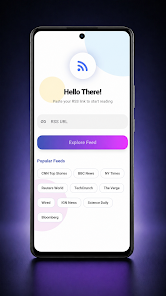
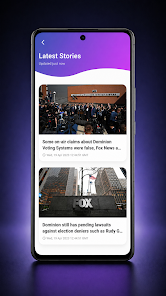
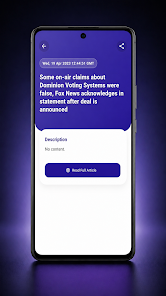
RSS Reader is a lightweight Android app built for people who want to follow dozens of sites without clutter or long load times. RSS Reader lets you add any RSS feed URL, see a tidy list of articles, and open full stories with images in a clean, modern view. Whether you scan headlines between tasks or settle in for longer reading, RSS Reader focuses on speed, simple feed management, and an interface that keeps content front and center.
At its core, RSS Reader handles the essentials with minimal fuss: add any RSS feed URL and the app fetches recent items into an organized article list that’s easy to scan. Each entry expands to show the full article text and embedded images when available, and you can open the original story in your device browser or share it via your preferred messaging apps. The reader offers on-demand loading so you control how many items are fetched for each feed, helping to conserve data and keep the app responsive.
Navigation is intentionally simple. From the main feed list you can tap a feed to view its items, tap an article to read details, and use the built-in action icons to open or share content. Feed management supports adding and removing feed URLs without a sign-in or account, and you can reorder or collapse feeds to prioritize sources you check most often. These straightforward controls make it easy to progress through new items: scan headlines, open interesting stories, and move on without extra steps.
Instead of levels or game-like progression, RSS Reader structures your reading into a clear hierarchy: source feeds, item lists, and article detail pages. This creates a predictable flow for catching up—start at the top of your most important feed, work through unread items, and load more when you want to go deeper. The app maintains a simple read/unread flow so you can see which feeds have fresh content and return to unfinished items when you have time.
RSS Reader uses a modern, uncluttered design that emphasizes legibility: generous line spacing, clear thumbnails where available, and a neutral color palette that keeps attention on headlines and images. Basic customization options let you adjust text size and list density so you can choose a comfortable reading posture, but the app intentionally avoids deep theme or layout complexity to stay lightweight. Power users who need advanced theming or fine-grained layout controls will find the customization set intentionally minimal.
Performance is a priority in RSS Reader. The app is optimized for fast list scrolling and quick article rendering; images and text that are loaded remain cached for short-term access so recently viewed content opens more quickly and uses less repeated data. This caching makes the app tolerant of intermittent network conditions, though it is not a full offline sync solution—if you need cross-device continuity or guaranteed offline archives, note that RSS Reader does not include built-in account sync or permanent offline storage.
Designed for clear reading, RSS Reader works well with Android system accessibility features such as adjustable font scaling and high-contrast display settings. The interface keeps controls visible and consistent, which helps users who rely on predictable navigation patterns. Buttons are sized for easy tapping, and labels are concise to reduce ambiguity when scanning lists of headlines.
The app delivers ongoing value by making daily catching-up fast and low-friction: once feeds are added, a quick open yields the latest headlines and images, and the load-more option allows longer reading sessions when you want them. Because the app remains lightweight and uncluttered, it fits into a habitual reading routine without demanding frequent configuration, which encourages regular use over time.
RSS Reader keeps features intentionally focused, so there are trade-offs to be aware of: advanced customization options are limited, and there is no built-in cross-device sync or account system for automatic feed synchronization across multiple phones or tablets. If you require sophisticated filtering rules, multi-device syncing, or integrated discovery services, those capabilities are not part of this app’s scope. For users who want a fast, straightforward reader with direct control over feed URLs and a distraction-free presentation, RSS Reader remains a practical choice.
To start, paste the exact RSS feed URL into the add-feed field and give the source an optional name. Organize your most-checked feeds toward the top, use the load-more control to fetch additional entries only when you need them, and open stories in your browser if you need full site functionality. Regularly prune feeds you no longer read to keep the list concise and responsive.