Minibus Checklist
Version: 1.1.0
47.96MB
4

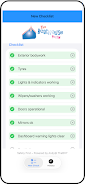
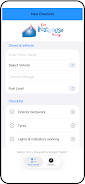
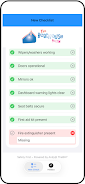
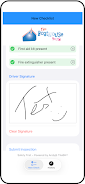
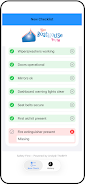
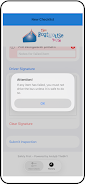
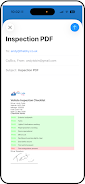
Minibus Checklist is a lightweight inspection app that helps drivers and operators complete routine vehicle safety checks quickly and reliably. Designed for schools, transport providers and small fleet operators, Minibus Checklist records driver and vehicle details, guides users through structured pass/fail items, allows attaching photos to illustrate faults and captures a digital signature so every inspection is documented and exportable as a professional PDF.
The app focuses on practical daily inspections rather than in-depth diagnostics. Each inspection session collects essential driver and vehicle information such as driver name, vehicle registration, mileage and fuel level. A clearly structured checklist groups safety items into logical sections (exterior lights, brakes and steering, passenger safety, emergency equipment and interior checks) with simple pass/fail options and an optional comment field for each item. When an item fails, users can attach one or more photos taken with the device camera to provide visual evidence and add a short note. At the end of an inspection, a signature pad captures a driver or supervisor signature so the record is verifiable.
The interface is built for quick, repeatable use: tap to select or toggle pass/fail, use camera controls to capture images, and draw a signature with a finger or stylus. Fields for mileage and fuel accept numeric input and the app timestamps each inspection automatically. A guided flow moves users through the checklist section by section, reducing the chance of missed items. Common controls are large and clearly labeled so drivers can complete checks on a tablet or phone without navigating complex menus.
Inspections are saved as dated records on the device to create an audit trail that is easy to review. Each saved inspection includes the checklist responses, attached photos, the captured signature and the recorded driver/vehicle details. Minibus Checklist generates a clean PDF report for any inspection that shows date/time, results, failed items with photos and the signature; reports are ready to preview on-device and share via standard Android share methods. Having a reliable sequence of dated inspections supports internal audits and compliance reviews by providing a clear progression of checks over time.
The app uses a simple, high-contrast layout with clear typography and large interactive elements to suit drivers who need to work quickly. Labels are explicit and avoid technical jargon so non-technical staff can complete inspections consistently. Accessibility considerations include touch targets sized for gloves, concise on-screen prompts and straightforward navigation so users with varying experience levels can operate the app safely while focusing on the vehicle and surroundings.
Checklists are organized into sections that reflect real-world inspection stages, allowing organizations to align the app with their own day-to-day procedures. Fields for driver and vehicle details reduce repetitive typing by keeping the most relevant information on the main inspection screen. The practical result is a repeatable workflow that minimizes time spent filling forms while keeping evidence and signatures where they matter.
Minibus Checklist stores inspection records locally on the device so drivers can complete checks in low-coverage or remote locations without interruption. Reports and evidence remain on the device until the user chooses to export or share them, giving operators control over how they retain and distribute records. Local storage helps ensure inspections can be completed wherever the vehicle is parked or operated.
Minibus Checklist is particularly suited to school transport managers, private hire operators and small-to-medium fleet administrators who need consistent, paper-free inspections and verifiable audit trails. The app reduces paperwork, standardizes routine checks and helps demonstrate that daily safety processes have been followed.
Minibus Checklist is intended to document routine safety checks; it is not a substitute for professional mechanical repair or in-depth diagnostic tools. The accuracy of records depends on users completing checks carefully and attaching evidence when faults are identified. For best results use the app as part of a broader maintenance program that includes scheduled servicing by qualified technicians.