Komodo Go
Version: 0.5.1
26.00MB
4.5
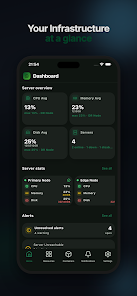
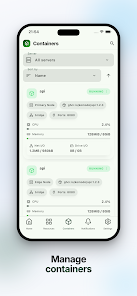
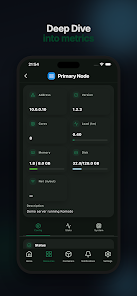
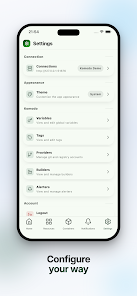
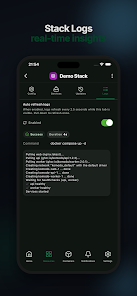
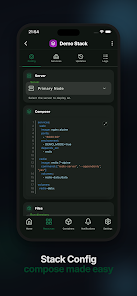
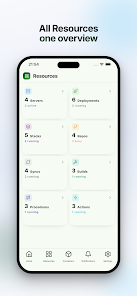
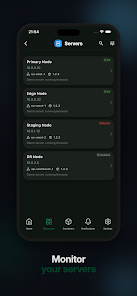
Komodo Go is a mobile client built to put essential Komodo infrastructure monitoring and management into your pocket, helping administrators perform quick checks, browse resources and investigate incidents from a phone or tablet. The app connects to a self‑hosted or hosted Komodo instance using API credentials and also provides a built‑in demo connection so you can explore the interface without a production backend. Komodo Go focuses on concise dashboards, clear resource lists and fast access to stack configuration and logs so you can identify problems and act quickly when you are away from a desk.
The home dashboard delivers a compact overview of system health and recent events with color‑coded indicators and a prioritized list of resources that need attention. A resources browser presents servers, stacks and containers in a hierarchical view so you can drill down from cluster to individual server details. Stack configuration panels let you inspect deployed parameters, and integrated log views show recent entries for a selected service or container. Connection management allows you to save multiple API endpoints and switch between them, while a demo mode is included for evaluation and training without requiring credentials.
The interface is optimized for touch: tap to open resource details, swipe to navigate between dashboard sections and long‑press to reveal quick actions such as reconnecting a service or copying endpoint information. Search and filter controls help you locate servers or containers by name, tag or status, and contextual back buttons keep navigation predictable on smaller screens. Controls are intentionally minimal so common tasks can be completed with a few taps, and the app preserves your last view so you can return to a working context quickly after switching tasks.
Onboarding emphasizes practical progression: the demo connection walks you through how the app organizes clusters and stacks, while a step‑by‑step connection setup guides you through adding real API credentials. As you add connections and mark favorite resources, the app adapts by surfacing those items on the home dashboard for faster access. There is no complex account ladder or hidden feature gates; progression is based on familiarity with your own infrastructure and the incremental convenience of saved configurations and shortcuts.
Komodo Go uses a compact, data‑first visual language that favors readable lists and small summary cards over dense graphs, which keeps the UI responsive on phones and tablets. Status colors follow common conventions so alerts and warnings are instantly recognizable, and expandable panels allow you to reveal additional configuration or log detail without losing context. Visual transitions are kept subtle to emphasize clarity over animation, making the app practical for on‑call use where speed and legibility matter.
You can personalize the app with preference settings for theme contrast, date and time formats, and notification behavior so Komodo Go fits different workflows and screen sizes. Accessibility considerations include large tap targets, adjustable font scaling and clear contrast in status indicators; where platform support exists, the app works with system‑level screen readers. These options are intended to make the mobile experience reliable for a wide range of users during fast incident responses.
Komodo Go provides a limited offline experience by caching recently viewed resources and log snippets so you can review critical context when a connection is momentarily unavailable. The demo connection remains fully usable offline for exploration and training. Credentials and sensitive data are stored only as allowed by the platform, and connection flows rely on API authentication rather than embedding long‑lived secrets in the app itself. Administrators should treat the app as a convenient client and follow their own security practices when exposing API access.
Common workflows include on‑call triage—where you quickly inspect node status and recent logs—pre‑deployment checks that verify stack configurations, and routine spot checks that keep you informed without launching a full web console. For teams that run multiple Komodo instances or split responsibilities across environments, the ability to store and switch connections reduces friction and helps keep context aligned with the task at hand. The app is designed to complement, not replace, your full desktop administration tools.
Komodo Go is an independent third‑party mobile client and is not affiliated with the Komodo project; feature parity with the full web UI is limited by design in order to stay compact and focused on mobile workflows. Full administrative workflows and advanced configuration tasks should still be performed in the primary web interface. The app requires access to a Komodo instance for full functionality and does not provide separate hosting of infrastructure on its own.
The development team maintains Komodo Go as a lightweight, practical tool for administrators who need fast context on mobile devices. Updates prioritize stability, compatibility with current Komodo API versions and improvements suggested by active users. If you evaluate the demo connection and decide to connect to your instance, the team recommends keeping API keys under your control and reviewing device security settings to match your operational policies.