Mi Control Center
Version: 18.5.1
18.00MB
4.5
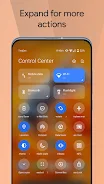
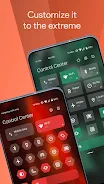
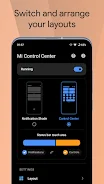
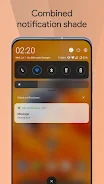
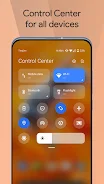
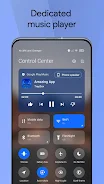
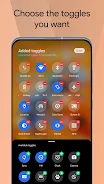
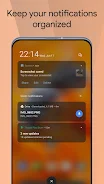
Mi Control Center is a customizable Android utility that replaces your phone's notification shade with a control center inspired by MIUI and iOS designs. It separates quick settings from notifications, adds configurable trigger zones for left and right swipes, and gives quick access to camera, screen recorder, screenshots, night mode, volume controls and favorite apps while allowing color themes, tile shapes and adjustable backgrounds for a personalized appearance.
Mi Control Center includes two layout styles: a combined view of quick toggles and notifications or a separate control center similar to MIUI 12+. It provides full color and appearance control with custom tile shapes, profile picture in the shade and multiple icon styles. Backgrounds can be solid colors, live wallpapers or image blur with transparency and adjustable blur levels. Notification handling supports quick reply, auto-bundling and actions such as read, snooze or dismiss directly from the shade. Media controls show dynamic colors from album artwork and provide a progress bar for seeking within tracks. Configurable trigger areas offer fast access to camera, screen recorder, screenshots, night mode, volume and favorite apps; some grid layout options are available in the Pro version.
Faster access to essential controls and apps comes through the redesigned shade and customizable triggers. Deep personalization is available via colors, backgrounds, tile shapes and profile picture options, and notification management is cleaner thanks to auto-bundling, snooze and inline quick reply. The media experience is improved with album-driven colors and in-notification seeking, while useful system shortcuts like screen recording and screenshots are accessible in one place.
Some features require Accessibility permission to enable automated toggles and to detect screen touches for trigger actions. Certain advanced options, such as changing the quick settings grid, are part of the Pro version and may require an upgrade. The app is independently developed and is not an official Apple or Xiaomi release, so it may not exactly match native control centers.
Mi Control Center is developed by an independent team and is not affiliated with Apple or Xiaomi. The app uses the AccessibilityService API to enable features like automatic toggles and trigger detection; the developer states they do not collect personal information through accessibility services and will not read sensitive screen content.