iFunny
Version: 8.46.11
56.09MB
4.2


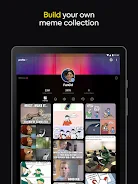
iFunny is a compact entertainment app designed to deliver short bursts of humor and distraction when you need a break. The app focuses on quick browsing, lightweight playback, and community-supplied images and short clips so you can dip in for a few minutes between tasks. iFunny keeps entry barriers low: there are no complex controls and the experience becomes more relevant as you interact and personalize your feed.
The central interaction model is simple and immediate. Content is presented as a stream of short images, memes, and brief videos that you can advance with a single swipe or tap. Interactions include reacting, commenting, saving favorites, and forwarding content to other apps. Creation tools are intentionally basic: you can add captions, simple overlays, or crop images before posting, which keeps the barrier to contributing low while still allowing personal expression.
Controls emphasize one-handed use and fast navigation. Swipe gestures move between items, tapping opens a detailed view, and long-pressing brings up actions such as save, share, or report. Playback controls for short clips include a play/pause toggle and a scrub bar for longer items; thumbnails and short captions make it easy to decide what to view next. A compact header and bottom navigation keep the most common actions within reach without cluttering the screen.
Instead of levels, the app organizes content by categories, collections, and time-based themes to guide discovery. Your personal progression is driven by your activity: saving items, reacting, and spending time on particular topics helps the app surface content that matches your taste. This creates a lightweight, individualized progression system where the feed becomes more useful the more you interact, and it rewards exploration by exposing new creators and themes over time.
The visual design favors clarity and efficiency. Thumbnails are prominent to help you scan quickly, while text overlays and subtle motion cues signal whether an item is a static image or a short clip. Visual polish focuses on fast loading and minimal animation so the app remains responsive on a broad range of devices. Color themes and a clean layout reduce visual clutter while supporting both light and dark viewing conditions.
Customization options center on feed preferences and appearance. You can adjust feed filters to see more or less of certain categories, save collections for later, and choose a simple theme for comfortable reading. Accessibility features include scalable text sizes, clear contrast for interface elements, and straightforward navigation labels to support screen readers. These choices prioritize usability for a diverse audience and help make the app approachable for new and returning users alike.
To respect varied network conditions, the app caches recently viewed items and allows offline access to saved content. This makes it practical to review favorites during short periods without connectivity and reduces repeated data usage for frequently viewed material. Media is optimized to balance visual quality with download size so that browsing remains smooth on modest data plans.
Replay value comes from a steady refresh of community contributions and periodic themed content rotates that encourage repeat visits. Frequent updates introduce small features and interface refinements rather than wholesale changes, so habitual users see incremental improvement while new users find a familiar, low-friction experience. The app supports occasional creative prompts or themed weeks that invite users to contribute their own takes on a topic.
Emphasis is placed on a respectful, community-driven environment where content is shaped by contributors and user feedback. Moderation tools and reporting options are integrated to help maintain quality and safety, and the app provides clear channels for users to flag inappropriate material. The result is an experience that balances open participation with practical safeguards.
For anyone looking for a lightweight, regularly refreshed source of brief entertainment, iFunny offers a low-effort way to browse, save, and contribute short-form content. The design keeps controls predictable and the feed adaptable, so users can enjoy quick laughs without a steep learning curve while still influencing their own experience through simple interactions.