
ONEWallet - Cards Wallet
Version: 2.2.3
15.00MB
4
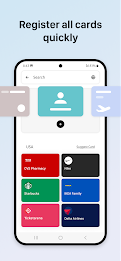
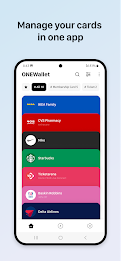
ONEWallet - Cards Wallet brings barcode and QR-based passes together in a focused, easy-to-use app so you can carry flight tickets, loyalty cards, membership passes, coupons and other scannable items on your phone instead of in a physical wallet. The app opens quickly and keeps the passes you need most within reach; ONEWallet - Cards Wallet supports camera scanning, .pkpass import and the ability to analyze saved images so adding items is fast and requires minimal typing.
The app supports common barcode and QR formats and offers simple, predictable controls for daily use. Adding a pass is usually a single camera scan or an import of a .pkpass file; once saved, you tap a card to view or present it, long-press for contextual actions such as favorite, move or delete, and use drag-and-drop to reorder items. Pull-to-refresh and small in-app shortcuts keep visible changes synchronized. Home-screen widgets and one-tap shortcuts place frequently used passes on the home screen, and compatible smartwatch support provides quick access when you need hands-free presentation. These interaction mechanics are designed so typical controls remain within thumb reach on both small and large screens.
Rather than a gamified progression, ONEWallet - Cards Wallet uses an organizational progression that adapts as your collection grows. You create nested categories for work, travel, shopping or events and apply favorites or color tags to highlight important passes. As you add and use cards, the app learns which items you rely on and surfaces them in suggested folders and shortcuts so finding what you need becomes faster over time. Reorderable views, pinned items and the ability to place a pass in multiple categories give flexible structure without forcing a single workflow, so your collection evolves with how you live and travel.
The interface is intentionally card-based and minimal to help visual scanning and reduce clutter. Each pass shows a clear thumbnail, readable typography and optional color accents so you can pick out the right ticket or loyalty card at a glance. You can apply custom color labels, change thumbnail previews, and switch contrast or text size settings for better readability. These visual options let you tune the presentation to your preferences while keeping a consistent, uncluttered layout across lists, widgets and shortcut previews.
Scanning relies primarily on your phone camera with an auto-detect mode that recognizes barcode and QR patterns and offers an on-screen guide when alignment helps. When a scan is difficult the app suggests reorienting the pass, enabling the flash or importing a saved screenshot for analysis. Manual entry remains available if automatic detection fails. These challenge-handling measures explain why the app requests camera permission and read access to storage: to let the app scan live codes, analyze images you already have, and reduce friction when adding older screenshots, reflective tickets or low-contrast barcodes.
ONEWallet - Cards Wallet provides export and restore tools so you can back up your collection and move it between devices without relying on a specific cloud account. Stored passes remain on your device unless you choose to export them, and local backup files can be saved and restored by you to preserve offline access for travel or areas with limited connectivity. The app presents clear permission prompts for camera and storage access and allows you to control exactly when data leaves your device through manual export options.
The app is built to respect Android accessibility settings, supporting larger text sizes, high-contrast display options and simplified layouts for easier navigation. Widgets and shortcuts are optimized for phones and tablets, and smartwatch integration surfaces frequently used cards for one-handed presentation. Small feedback cues, such as success or error indicators after a scan and preview thumbnails for imported .pkpass files, improve clarity and make everyday tasks more reliable for users with different needs.
Installation requires camera permission for scanning and read access to storage for analyzing saved images or files when using auto-detect; these permissions are only used to add and manage passes. ONEWallet - Cards Wallet supports offline use of stored passes and offers straightforward backup and restore options so you can reduce physical clutter and keep tickets, boarding passes and loyalty cards organized for trips, daily shopping or events. The app focuses on dependable organization and quick presentation, helping you carry fewer paper items while keeping control of your data and access preferences.