GeoZilla
Version: 6.59.4
63.92MB
4.3
GeoZilla is a family locator and safety app that helps you keep track of loved ones in real time, share locations automatically, and receive timely alerts for arrivals or departures. It combines precise GPS tracking with simple geofencing and emergency features so families can stay connected and informed.
GeoZilla offers a compact set of tools focused on location sharing and safety. Real-time location updates show where each family member is on a map, while customizable geofences let you set safe zones around home, school, or work. Automatic check-ins and arrival notifications reduce the need for constant messaging.
Designed for families, caregivers, and small teams, GeoZilla streamlines day-to-day coordination. Parents can confirm kids arrived safely at school, caregivers can check elderly relatives without intrusive calls, and carpool organizers can track estimated arrival times. Notifications are discreet and configurable to avoid overwhelming users with alerts.
The app uses a clean, map-centered interface that prioritizes location clarity. A bottom navigation lets you switch between the main map, places, alerts, and settings quickly. Adding family members is done via invitations, and privacy settings control who sees location details and when. The workflow emphasizes one-tap actions for sharing location or requesting a check-in.
Privacy is central to any location service, and GeoZilla provides granular controls. You decide when to share your location and with whom, and you can pause sharing temporarily. Permission requests are transparent: the app explains why background location and notifications are needed for uninterrupted tracking and geofence alerts.
GeoZilla is optimized to balance accuracy and battery consumption. Location polling frequency adapts based on movement and user preferences, which helps preserve battery life while maintaining useful precision. The app works across a wide range of Android devices and integrates with common system notification and location services for consistent performance.
One of GeoZilla’s strengths is the ability to automate routine checks. Create custom places and assign arrival/departure alerts for each member. For example, set a geofence around school to receive a notification when your child arrives, or create a workplace zone to log hours for team members. Alerts can be routed to specific people so only relevant contacts receive them.
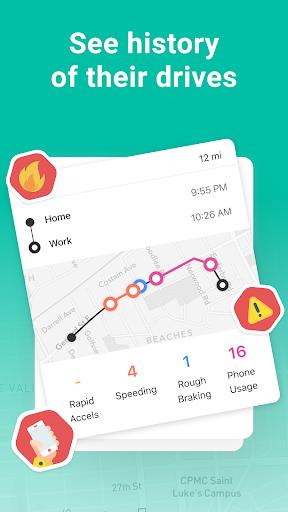
In addition to location sharing, GeoZilla includes an SOS option that transmits a person’s location to selected contacts. This feature is useful during travel or if a user feels unsafe. The app can also keep a short history of recent locations, which helps retrace steps if someone is lost or needs assistance.
To get the most from GeoZilla, configure places and alerts when you first set up your account, invite core family members, and adjust battery settings according to your needs. Encourage group members to enable background location for accurate updates and to use the check-in feature to confirm safe arrivals without calls.
GeoZilla offers a free tier for basic location tracking and alerts, with premium subscriptions unlocking advanced features such as extended location history, additional places, and priority support. Evaluate the free features first to ensure the app meets your needs before upgrading.
GeoZilla is a strong choice for families, caregivers, and small teams who need a straightforward, privacy-conscious way to share locations and receive timely notifications. Its mix of live tracking, geofencing, and emergency tools makes it practical for everyday coordination and peace of mind.
With simple setup, configurable privacy, and a focus on minimizing battery impact, GeoZilla delivers a well-rounded location-sharing experience suited to users who want dependable tracking without complex configuration.