OnePlayer
Version: 2.4.0
128.00MB
4.4


OnePlayer is a compact, versatile Android media player designed to play video and audio files smoothly while offering a clean, distraction-free interface. It supports local and networked playback, hardware acceleration, and subtitle handling, making it a practical choice for users who want reliable playback with simple controls and efficient performance.
OnePlayer packs features that cover everyday playback needs without overwhelming the user. Expect broad codec support, adjustable playback speed, gesture-driven volume and brightness controls, and seamless subtitle synchronization. Network streaming through DLNA/UPnP and support for external storage make it easy to access media from multiple sources.
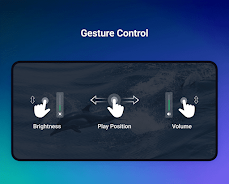
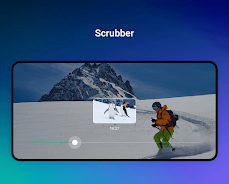
The interface focuses on clarity: large playback buttons, an uncluttered timeline, and contextual menus that appear only when needed. Touch gestures let you seek, change brightness, and adjust volume with quick swipes, while on-screen buttons provide precise control. A minimal settings layout keeps advanced options accessible but out of the way for casual viewing sessions.
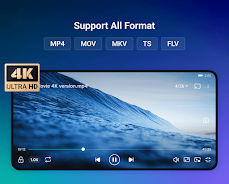
OnePlayer handles a wide range of audio and video formats, including popular containers like MP4, MKV, AVI, and media codecs common on Android devices. Hardware acceleration reduces CPU load and improves battery life during high-resolution playback. The app adapts to different screen sizes and devices, maintaining stable performance even with 4K files on capable hardware.
The app provides basic library management tools to organize local collections by folder or media type. Thumbnail generation and metadata reading make browsing easier, and users can create simple playlists for continuous play. Customization includes theme adjustments, subtitle font sizing, and default audio tracks so playback matches personal preferences.
Subtitle support is robust, with options to load external SRT/ASS files, adjust timing, and tweak appearance. Audio features include track selection, stereo/mono switching, and balance control, which can be useful for multi-language files or older recordings. These controls ensure the playback experience is both accessible and precise.
OnePlayer’s networking tools let you stream from NAS devices, network shares, or other phones on the same Wi-Fi network. DLNA/UPnP support enables discovery of media servers, and fast buffering options reduce stutter on unreliable connections. Casting tools offer simple sending of content to compatible TVs and streaming boxes for larger-screen viewing.
Designed with mobile constraints in mind, the app uses hardware decoding when available to keep battery consumption low. Background playback and lock-screen controls let audio continue without keeping the screen active, and the lightweight codebase minimizes memory usage so other apps remain responsive while media plays.
Installation and setup are straightforward: grant storage permissions, let the app scan your media folders, and adjust your preferred default settings. Loading a video from a file manager automatically opens playback, while the network setup wizard helps connect to DLNA servers or shared drives with minimal effort.
Users who want a dependable media player that balances power and simplicity will find OnePlayer a good fit. It works well for people who need solid subtitle handling, low-resource performance on older phones, or easy access to networked libraries without navigating complex menus.
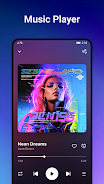
Whether you’re streaming a movie from a home NAS or listening to local music files, OnePlayer provides a focused playback experience with sensible defaults and enough customization for power users. Its compact design and steady performance make it a practical addition to any Android device’s toolkit.