Rádio Mais FM
Version: 2.0.0
20.00MB
4.1
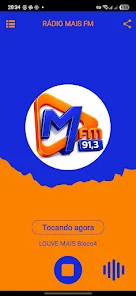
Rádio Mais FM is a compact Android radio player that puts local and national stations at your fingertips, delivering live music, news, and talk shows with low-latency streaming and easy station management. It’s designed for listeners who want dependable audio playback, intuitive controls, and quick access to favorite channels.
Rádio Mais FM focuses on straightforward live radio listening without clutter. The app aggregates FM stations and offers clear station metadata, basic playback controls, and a lightweight footprint. It targets users who prefer tuning into curated broadcasts rather than managing large music libraries or podcasts.
Open Rádio Mais FM and you land on a clean station list with album art and program tags where available. Tap to play; the player shows current track or show details if the broadcaster provides them. Use the search bar to find a station, add it to Favorites, or swipe to reveal more info. Controls remain accessible through notifications and a compact player widget.
While Rádio Mais FM stays lean, it offers practical customization for everyday listeners. Arrange favorites by priority, enable a simple sleep timer to switch off playback after a set time, and pick low or high bitrate streaming depending on your network. These settings help tailor the listening experience without a steep learning curve.
The interface prioritizes readability. Large station icons, clear typography, and responsive buttons make navigation quick. Start-up times are short and memory usage is modest, so the app runs smoothly on budget devices as well as newer handsets. Adaptive buffering reduces interruptions on unstable connections.
Listeners appreciate Rádio Mais FM for its no-frills approach: it starts quickly, stays reliable, and puts local content front and center. It’s especially useful for commuters who need a dependable radio that doesn’t interfere with other phone tasks. The notification controls and background playback mean shows continue while you navigate other apps.
The app installs like any standard Android package and requests only the permissions needed for streaming and notifications. Make sure your device runs a supported Android version and has a stable internet connection. No account sign-up is required, so you can start listening immediately after installation.
If you want simple access to FM radio programming without the complexity of additional media services, Rádio Mais FM fits well. It’s a good match for users interested in live news, regional shows, talk radio, and genre-specific music channels who value speed and simplicity over extensive extras.
For anyone seeking a lightweight radio player that balances performance and essential features, Rádio Mais FM provides a practical, user-friendly experience that keeps your favorite stations easy to reach and enjoyable to listen to.