
Gayatri Chalisa With Audio
Version: 1.0
26.00MB
4.3

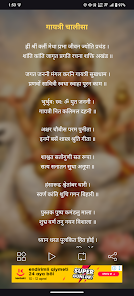
Gayatri Chalisa With Audio places the traditional Gayatri Chalisa on your phone with clear narration, easy-to-read lyrics and simple playback controls so you can chant along anywhere. Gayatri Chalisa With Audio is designed to help both newcomers and regular practitioners by combining steady, high-quality audio with a tidy on-screen layout that highlights lines as they are sung, making pronunciation and rhythm easier to follow. The app’s compact, distraction-free approach keeps the focus on practice and calm, and the built-in repeat counter helps you maintain uninterrupted chanting sessions.
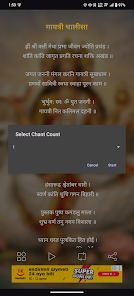
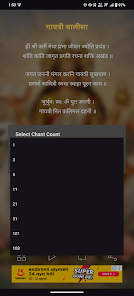
High-quality audio and clean text presentation are at the core of Gayatri Chalisa With Audio: the recording emphasizes natural rhythm and clear enunciation so learners can hear each verse. Synchronized text highlighting follows the narration so you can read along one line at a time. The transport controls include play, pause and jump-to-verse gestures for precise navigation, and a visible playback progress bar shows where you are in the Chalisa. A repeat counter lets you choose how many full recitations to play automatically, supporting focused practice without manual repetition.
The interface prioritizes straightforward operation: large, readable lyrics, a single-tap play button and an obvious repeat counter are placed where they’re easy to reach. You can pause at any line and replay a passage to improve pronunciation or to reflect on the verse. Visual cues such as bolding or light highlighting mark the active line so users can keep their place while following the audio. Because the app avoids cluttered menus and excessive options, beginners and older users find the controls intuitive from the start.
While the app focuses on delivering a faithful recital rather than gamified progression, its structure supports steady improvement through repetition and focused sessions. Use the repeat counter and the playback controls to create a consistent practice routine: set a goal for a number of recitations, follow the highlighted text to build familiarity with pronunciation, and use short pause-and-repeat practice for difficult lines. This hands-on repetition encourages gradual mastery of verse flow and cadence over multiple sessions.
Gayatri Chalisa With Audio is built with a minimal visual design that reduces distractions and loads quickly on most devices. Text contrast and font sizing are chosen for legibility across screen sizes so the lyrics remain clear whether you are reading at arm’s length or holding the device near. The app’s lightweight footprint helps preserve battery life and keeps memory use modest, making it suitable for everyday use on older phones as well as the latest models. The emphasis on clear audio plus readable text supports users with differing familiarity and hearing preferences; pausing and repeating lines makes it easier to learn verses slowly.
The primary replay value comes from regular devotional use and practice rather than levels or achievements: many users will return daily to complete a preferred number of recitations using the repeat counter. Customization focuses on the essentials—playback start/stop, jump-to-verse and repeat count—so you can tailor a session to your attention span and practice goals without wading through complex settings. This simplicity encourages frequent, short sessions that add up to consistent progress.
Gayatri Chalisa With Audio is intentionally specialized: it concentrates on a single devotional hymn and therefore does not include a broad catalogue of other chants or extended commentary. Users seeking in-depth textual exegesis, multiple musical arrangements or extensive visual themes may find the app intentionally minimal. There are only a few straightforward controls by design, so advanced customization options are limited.
To begin, open the app, tap the central play button and follow the highlighted lyrics as the Chalisa plays. Use the repeat counter to set how many times the full recitation should repeat if you want hands-free chanting. Pause and replay individual lines to improve pronunciation or steady your rhythm. Over time, the clear audio and readable layout help build confidence in chanting and support a calm, regular devotional practice with Gayatri Chalisa With Audio.