HiOS Launcher - Fast
Version: 13.9.043.2
56.90MB
4.4

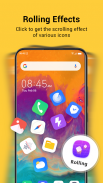
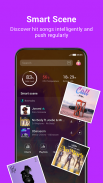
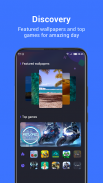

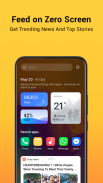
HiOS Launcher - Fast is a lightweight Android launcher built for people who want their phone to feel quicker and less cluttered. HiOS Launcher - Fast prioritizes performance and simple personalization: a compact launcher core reduces lag, a Zero Screen feed surfaces trending news and recommended games, Smart Scene listens for popular songs and suggests music, and a Discovery section highlights fresh wallpapers and featured apps. The interface also gives quick access to one-click font previews, a freezer function to pause rarely used apps, and theme controls so you can refine the look of your home screen without digging through complex menus.
The core ambition of HiOS Launcher - Fast is responsiveness. A lean home engine speeds up app launches and home-to-app transitions while keeping memory and battery use reasonable on budget devices. Zero Screen acts as a contextual hub next to your main home panel: it aggregates short, scrollable cards of trending news, game recommendations and occasionally suggested content to explore. Smart Scene adapts quietly in the background, detecting popular tracks and surface music suggestions relevant to what you listen to, helping you discover songs without leaving the home experience. Discovery focuses on visual refresh: curated wallpapers, seasonal themes and recommended games rotate regularly so your home setup feels updated each week.
HiOS Launcher - Fast keeps interactions familiar so new users can get started immediately. Standard home gestures and taps can be used to open the app drawer, place widgets and edit shortcuts, while long-press options let you fine-tune individual icons and widgets. The freezer tool allows you to temporarily suspend an app’s background activity to save resources; frozen apps remain on the device but won’t run until you re-enable them. One-click font preview speeds the process of selecting typography, showing a live preview of your system fonts so you can see changes before applying them. These controls are designed to reduce the number of steps required to personalize your device and to make adjustments reversible and safe.
Customization in HiOS Launcher - Fast emphasizes practical choices over endless options: you can adjust icon size and grid spacing to fit more or fewer apps on each screen, select themes that change accent colors and system elements, and cycle wallpapers from Discovery to keep the visual style fresh. The launcher tracks simple usage patterns and progressively tailors suggestions in Zero Screen and Discovery to match what you use most — for example, recommending wallpapers similar to ones you favor or surfacing music tied to the genres you listen to. This form of progression is about personalization growth rather than a game-like leveling system: the launcher becomes more relevant over time by learning the kinds of content and layouts you prefer.
Because it is built for speed, HiOS Launcher - Fast aims to improve perceived performance on phones with limited resources. Lightweight binaries and selective background activity mean everyday navigation feels snappier, and the freezer feature helps reclaim memory without uninstalling apps. Replay value comes from the Discovery and Smart Scene elements: regular wallpaper refreshes, rotating highlights and music suggestions encourage returning to the home setup to explore new looks or tracks. Stability-focused updates target bug fixes and compatibility improvements rather than adding heavy modules, keeping the runtime footprint predictable across OS versions.
The launcher includes accessibility-minded options like adjustable font previews, larger icon sizing and a simplified layout mode for users who prefer less visual complexity. Basic home and app drawer functionality works fully offline; only content feeds such as Zero Screen, Discovery recommendations and Smart Scene music suggestions require an internet connection to fetch current items. Because the app is optimized for low memory and CPU use, it is a good fit for older or budget devices but will also run smoothly on mid-range hardware.
Installing HiOS Launcher - Fast provides an immediate change in how your home screen behaves: expect faster transitions, a compact settings experience for themes and fonts, and discovery-focused content that updates over time. Some sections may continue evolving as the team refines recommendations and adds more curated visuals, so you may find new wallpapers and featured apps appear periodically. The launcher is designed to be a lightweight, practical alternative for users who want a responsive home experience with modest, useful personalization options rather than overwhelming feature lists.