Gastros
Version: 1.0.8
94.58MB
4.5

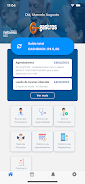
Gastros is a focused mobile app that helps users discover, manage, and track food experiences—whether you’re exploring local restaurants, cataloging recipes, or monitoring nutritional intake. It combines a clean interface with smart organization tools to streamline meal planning and dining discoveries for everyday users and food enthusiasts alike.
At its core, Gastros is designed to simplify how you find and remember meals. The app organizes favorites, stores quick notes, and surfaces nearby dining options based on simple filters. Instead of a crowded feed, you get intentional tools for making better food choices and remembering what you liked.
Gastros uses a straightforward workflow: search or add an item, tag it, and categorize it. The discovery engine pulls nearby spots with quick summary cards. Tapping a card reveals photos, hours, and user notes. For recipes, you can import from a URL or enter details manually. Meal logs are timestamped and can be annotated with feelings or nutritional tags.
The interface prioritizes readability. Large images and bold headings make content scannable, while subtle icons guide actions without clutter. Gastros is optimized for smooth scrolling and quick transitions; animations are minimal to maintain responsiveness on mid-range devices. Battery usage is modest because background processes are limited to optional sync operations.
Getting the most from Gastros means adapting a shared routine: create a few tailored lists, keep a running recipe you cook often, and tag new restaurants right after a visit. Use the meal log for subjective notes like texture or service—these personal signals become valuable when you revisit choices later.
Customization focuses on practicality. Adjust notification frequency for meal reminders, switch measurement units for recipes, and choose which categories appear on your home screen. The app supports multiple profiles so families can maintain separate libraries while sharing selected lists.
Gastros limits data collection to essentials like saved items and optional location data for discovery features. Account sync is encrypted and offers a local-only mode that stores data on the device when users prefer not to use cloud services. Export options let you back up your lists and recipe entries as CSV files.
Gastros fits a broad audience: busy professionals who need quick meal decisions, home cooks building a recipe archive, and travelers scouting eateries in unfamiliar cities. It’s particularly useful for users who value simple organization over a social-network-style feed.
Installation is straightforward: download from the Play Store, grant location if you want nearby suggestions, and optionally sign in to sync across devices. Gastros keeps onboarding short with a quick tour that highlights the main actions so you can begin saving and organizing immediately.
People return to Gastros because it removes friction from everyday food decisions. The app doesn’t try to be everything at once; instead, it provides reliable tools for discovery, recall, and planning. The focused feature set and predictable behavior make it a practical addition to a food-focused digital toolkit.
Whether you’re curating a personal cookbook, mapping out restaurants for a weekend outing, or quickly logging meals, Gastros combines simple design and useful features to make food organization easier and more rewarding.