SafeOS
Version: 1.7.4
22.35MB
4.2
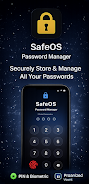
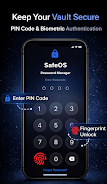
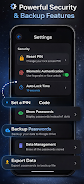
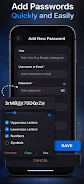
SafeOS is a compact password manager designed to store and organize your login credentials in a single encrypted vault, making it easier to manage online accounts while keeping privacy and security front and center. SafeOS focuses on straightforward access: set a PIN or use biometric unlock to open your vault, rely on automatic locking when your device is idle, and use a built-in password generator to create stronger credentials. For users who want a minimal, secure place to generate, save, and retrieve passwords without unnecessary complexity, SafeOS provides a sensible balance of features and ease of use.
The encrypted vault in SafeOS stores passwords, notes, and account metadata locally in a secure format; access is controlled by a PIN and optional biometric authentication such as fingerprint or face unlock. Auto-locking protects your vault when the device is not in use, and the dark-mode interface helps reduce eye strain for night-time use. The built-in generator creates strong passwords with configurable options for uppercase, lowercase, numbers and symbols, and you can copy generated or stored passwords to the clipboard for quick sign-ins. Import and export tools let you move data between devices or create local backups, while encrypted backups to Google Drive provide an off-device recovery option if you switch phones.
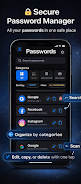
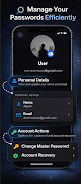
SafeOS presents a clean, list-based layout that groups entries by category and supports inline search and filters so you can find credentials quickly. Adding a new entry is a simple form-based workflow: name the item, choose a category, paste or generate a password, and save. Editing, duplicating or deleting records is direct from the item screen, and common actions such as copying usernames and passwords are one-tap operations. The app also supports Android accessibility settings, which means screen readers and font scaling provided by the operating system will improve usability for users who need larger text or spoken feedback.
Rather than levels or progression typical in games, SafeOS helps you progress toward better account hygiene through repeatable actions: regularly generating unique passwords with the generator, replacing reused or weak passwords you identify with the search tool, and keeping organized categories to reduce friction when managing many accounts. Over time the app becomes a single source of truth for credentials, simplifying device changes via encrypted export and Google Drive restore so your collection can be rebuilt quickly when you upgrade hardware.
The interface emphasizes clarity and minimalism with a dark-mode option to reduce eye strain and conserve battery on OLED screens. You can choose how entries are displayed through simple view settings, and SafeOS intentionally keeps visual elements restrained to make important information easy to scan. This focused approach helps users concentrate on security tasks—creating, updating and organizing credentials—without distraction.
SafeOS encrypts stored data on the device so the primary vault remains protected even when the phone is offline. Encrypted backups to Google Drive are optional and stored in a way that requires the same credentials to restore, while local import/export allows you to move data without relying on third-party cloud services. Biometric unlock is convenient but not required; older devices can use PIN-only access. Because encryption keys and unlock credentials are tied to your device and chosen authentication method, SafeOS is designed to work securely whether you use it online for backups or keep everything local for maximum control.
Cloud backup in SafeOS uses Google Drive, so users who prefer alternative cloud providers will need to rely on the import/export features or local-only storage. Biometric features depend on device hardware and Android support, so on older phones PIN access will be the primary unlock method. The app does not require an account to use the local vault, but enabling cloud backup and restore does require a Google Drive account and permissions for storage access. These trade-offs are made to offer a simple, transparent backup path while keeping the core vault usable without mandatory cloud services.
SafeOS is suited to people who want an uncomplicated, privacy-minded password manager that gets basic tasks right: generate strong passwords, store them securely, and find them quickly. It is not aimed at enterprise single sign-on systems or complex password-sharing teams, but rather at individuals and small-scale users who value a lightweight, dependable tool for daily password hygiene and device-to-device migration.