
Lynx Khaki Use Key
Version: 29.29.29
16.00MB
4.5
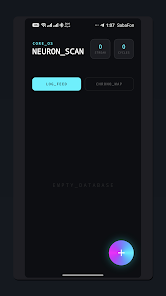
Lynx Khaki Use Key is a compact mood-tracking utility designed for fast daily input and clear long-term insight. Lynx Khaki Use Key helps you capture your emotional state using a curated set of mood types and expressive emojis while letting you add context with activity tags and short personal notes. The app’s simple workflow makes habit tracking unobtrusive and practical for users who want a lightweight, device-first record of how they feel over weeks and months.
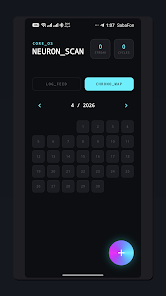
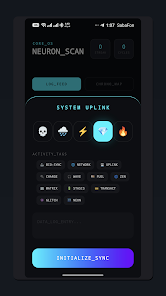
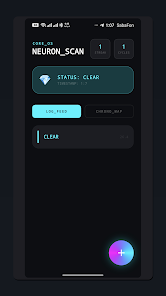
The core interaction in Lynx Khaki Use Key is intentionally straightforward: open the app, choose the mood that best matches how you feel from a curated palette, and optionally add a short note or an activity tag to explain the context. Entries are timestamped automatically so you can build a chronological log with minimal friction. A monthly calendar view maps those entries visually, while a separate chronological list shows full notes and tags for each day. This dual approach helps you quickly scan trends at a glance or drill into specifics when you want to recall what was happening on a particular date.
The interface focuses on quick, tap-based controls and clear visual feedback: select a mood, add a tag, and save. Editing an entry is direct — open the day in the calendar or log, change the mood or note, and save the revision. Tagging uses broad activity categories so you can attach context such as work, social time, or exercise without spending time creating custom labels. The minimal input steps are designed for one-handed use and to fit naturally into a busy routine.
Lynx Khaki Use Key tracks consistency with a streak counter and a total cycle monitor to show how often you log moods and how patterns repeat across longer intervals. These tools are not gamified with points or rankings; instead they provide simple numerical feedback to help you build awareness and small daily habits. The streak counter highlights consecutive days of logging, while the cycle monitor summarizes broader patterns so you can see whether particular moods recur in monthly cycles or around specific activities.
The app emphasizes a high-contrast dark-mode interface with subtle glowing effects to keep visual focus on the mood icons and calendar data. Iconography and emoji choices are selected for clarity, and text is presented in readable sizes to make scanning history comfortable. While the core mood set is curated to encourage consistent tagging, personal notes allow you to record more nuanced feelings and create your own shorthand over time. Users who prefer lighter themes should note the design leans toward dark-mode aesthetics.
Entries are organized both as a day-by-day chronological log and as a month-by-month calendar map, giving two complementary ways to review your data. The app stores a continuous history that you can consult to compare weeks, review months, and notice long-term shifts in mood or behavior. Because logging is quick and unobtrusive, the value of the app increases with continued use: the longer you keep entries, the more meaningful the patterns become, and the more useful the cycle monitor and streak feedback are for personal reflection.
Readability is a priority: the high-contrast palette and clear icons help users with low-vision preferences, and the minimalist layout reduces clutter for anyone who prefers a focused experience. Input fields are simple and rely on the device keyboard for notes, avoiding complex configuration steps. The app is designed to reduce cognitive load so logging becomes a brief, repeatable part of your daily routine rather than a task that interrupts your day.
All historical mood data is stored locally on your device to preserve privacy; there is no built-in cloud synchronization or external backup by default. This local persistent storage ensures your entries remain private and accessible when you are offline. Because the app keeps data on the device, consider your own backup routines if you change devices, and remember that local storage emphasizes privacy at the expense of cross-device sync.
The curated mood types in Lynx Khaki Use Key are designed to simplify daily logging, but they may feel restrictive for users who want fully customizable labels. The app’s focus on dark-mode visuals and glowing effects may not suit those who prefer more minimal or lighter themes. Finally, because data stays local, there is no automatic cloud-based synchronization across devices; this trade-off favors privacy over cross-device continuity. For users seeking a simple, private, and quick way to track emotional states and spot recurring patterns, Lynx Khaki Use Key offers a practical, low-friction solution.