PhotoLayers-Superimpose,Eraser
Version: 4.3.1
242.49MB
4.2
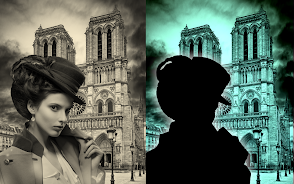

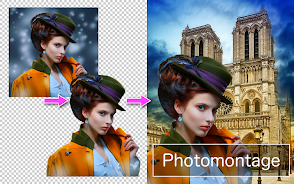
PhotoLayers-Superimpose,Eraser is a compact photo-editing app that combines layer-based composition with a precise background eraser and cutout tools to create realistic composites and transparent PNGs for social posts, product shots, or collages. Its intuitive interface and one-touch adjustments make complex edits quick and accessible on mobile devices.
The app centers on non-destructive layering, letting you stack multiple images and control each layer's opacity, blend mode, and position. PhotoLayers-Superimpose,Eraser includes a refined eraser brush, automatic background detection, manual lasso and polygon selection, and a softness slider for feathered edges. Export options let you save results as PNG with transparency or as flattened JPEGs for sharing.
Start by importing a foreground subject or several photos, then place them on separate layers. Use the automatic cutter for quick separation or take time with manual erasing to preserve fine detail like hair or product edges. Move, scale, and rotate layers until the composition reads naturally; layer order and blend modes play a large role in achieving realism.
PhotoLayers-Superimpose,Eraser adopts a clean, icon-driven layout that keeps the main canvas prominent while toolbars remain within thumb reach. The app provides contextual controls: when a layer is selected the most relevant tools become visible, reducing clutter. Undo and redo are immediately available, and a magnifier assists with detailed edge work.
Photographers and content creators will find practical value in the app for quick product mockups, social media thumbnails, or creative composites. Small business owners can isolate items from inconsistent backgrounds for catalog images. Hobbyists can combine travel shots into scenic montages without needing desktop software. The app supports both casual snap edits and polished deliverables.
Optimized for modern Android devices, PhotoLayers-Superimpose,Eraser balances processing speed with memory use so you can work with multiple high-resolution layers. The app leverages hardware acceleration where available, but very large projects may ask for additional RAM—saving projects periodically prevents data loss. Most recent Android versions are supported, and the app scales its UI for phones and tablets.
You can export finished images as transparent PNGs for layered use elsewhere or as flattened JPEGs for fast upload. The app provides direct share targets for messaging and social platforms, and it keeps an internal project format so you can revisit and refine compositions later. Batch export options speed up workflows when preparing multiple product shots.
Open PhotoLayers-Superimpose,Eraser, load your base image, and add foreground layers from the gallery or camera. Try the auto-erase to see instant results, then refine with the brush and lasso tools. Save a practice file to explore blend modes and export settings; within a few minutes you'll understand how layers and masks change the overall look.
Designed for on-device compositing, PhotoLayers-Superimpose,Eraser provides a compact but capable toolkit for users who need reliable background removal and layered editing without a desktop. The combination of automatic and manual tools makes it flexible for both quick edits and careful retouching, enabling polished imagery from a mobile workflow.