
CetusPlay MOD Pro Unlocked
Version: 4.9.4.532
24.72MB
4.3
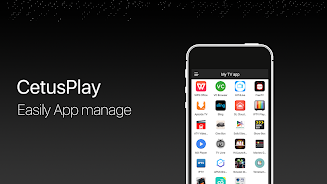
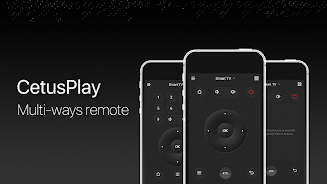
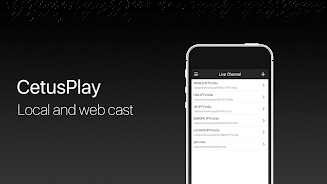
CetusPlay MOD Pro Unlocked is a feature-rich remote and media control utility that turns your Android device into a powerful companion for smart TVs and streaming boxes. It provides customizable remote layouts, media casting, file transfer tools and advanced gesture controls to streamline navigation and playback across devices.
The core of CetusPlay MOD Pro Unlocked is a broad feature set designed for convenience and flexibility. Users gain access to a multi-mode remote with D-pad, keyboard, and touchpad input. Built-in media casting lets you stream local videos, photos, and music from phone to TV without complicated setup. The app also includes a file manager for browsing device storage, a screenshot tool for capturing TV frames, and an app launcher to start installed applications on your television device remotely.
The interface is organized into clear sections so functions are easy to find. The remote layout can switch between directional pad, air-mouse style pointer, and a full keyboard for text entry. Gesture controls and customizable button mappings let you assign often-used actions to gestures or shortcuts. Visual feedback on the phone shows connection status and battery levels, while large button areas help prevent accidental taps during fast navigation.
Getting connected is straightforward: both your Android phone and the TV or set-top box need to be on the same Wi-Fi network. The app scans the local network and lists reachable devices; selecting your TV pairs instantly. For devices that require manual entry, an IP connect option is available. After initial pairing, the connection is stored for quick reconnection in future sessions.
CetusPlay MOD Pro Unlocked emphasizes adaptability. Users can create custom remotes featuring only the buttons they use most, rearrange control layouts, or set up mode-specific profiles for gaming, media playback, or browsing. Theme adjustments and icon choices allow subtle visual changes to match personal preferences. Profiles can be saved and exported for use on another phone.
The streaming module supports common media formats and automatically transcodes content where possible for smoother playback. You can cast videos directly from local storage without needing a cloud server, or push photos and music to the TV with simple share actions. The built-in file manager offers basic operations like copy, move, delete, and install APK files on connected devices, making it practical for power users and developers managing media libraries.
Performance is optimized for low latency control and efficient media transfer. The app is compatible with a wide range of Android TV boxes, Smart TVs, and emulators. In situations with spotty Wi-Fi, the app provides reconnect attempts and troubleshooting tips. Battery consumption is reasonable during typical use, and advanced users can adjust polling intervals and background behavior to conserve power.
The app requests standard permissions for network access, storage, and input control to provide remote functionality. Pairing uses local network discovery to avoid sending sensitive data to external servers. For users focused on security, there are options to clear saved device pairings and revoke access from the phone.
To begin, install CetusPlay MOD Pro Unlocked on your phone, connect to your TV via local network scanning, and explore the remote modes to find the configuration that fits your routine. Spend a few minutes creating a custom profile for your preferred streaming apps and save it — that small setup time pays off during everyday use.
CetusPlay MOD Pro Unlocked delivers a versatile toolkit for anyone looking to simplify interactions with smart TVs and Android boxes. With extensive customization, reliable streaming, and focused controls, it’s designed to enhance home media control without a steep learning curve.


Smart Tools Mini
4.38.86MB

Iriun 4K Webcam MOD Premium Unlocked
4.16.70MB

AR Ruler App MOD Premium Unlocked
4.242.70MB

IXO RPAS
4.33.90MB

MagnetSearch MOD Premium Unlocked
4.46.80MB

Tasker MOD Premium Unlocked
4.235.90MB

InSave
4.414.29MB
Background Video Recorder Cam MOD Premium Unlocked
4.318.60MB