
iSharing
Version: 11.11.6.7
20.50MB
4.3


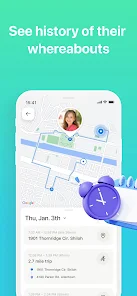


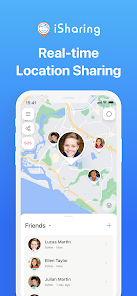
iSharing is a GPS-based family locator and phone tracker designed to help parents and caregivers stay connected with relatives and close friends. iSharing places a private, live map at the center of coordination so you can see where invited contacts are, receive arrival and departure alerts for saved locations, and act quickly when a device is lost or someone may need help. The app emphasizes consent-based sharing and straightforward controls so family safety features are easy to use without constant messaging.
Real-time location tracking shows live positions of approved contacts on a private map. Pins update in near real time when devices have GPS and network access, and saved places let you set locations such as home, school or work for automatic arrival and departure notifications. The app includes a dedicated kids GPS tracker workflow that simplifies setting up monitoring for children and teens while respecting permission and privacy.
Lost phone recovery tools help you locate a missing device by showing the last known position and offering options to make the phone ring or display an on-screen message to aid recovery. The built-in panic alert sends an immediate notification to trusted contacts with your current location when activated, so family members can respond faster in emergencies. Walkie-talkie style voice messaging provides short push-to-talk communication for quick check-ins without long calls or texting.
iSharing uses background location services and standard mobile permissions to provide continuous tracking when enabled. The app organizes people into private circles or groups so you control who sees location updates; invitations must be accepted before sharing begins. Settings let you manage visibility, notification types, and whether the app runs in the foreground or background. These controls are designed to balance real-time awareness with user consent and battery life considerations.
The core functionality of iSharing is available without a subscription, and an optional premium plan unlocks extended location history and more detailed driving reports for families that want additional context. Extended history helps reconstruct past routes and timing when needed for planning or reviewing travel; driving reports summarize trips for a selected timeframe. Upgrading is optional and managed inside the app, so families choose the level of detail they prefer.
The interface is map-centric with clear icons and color-coded markers for quick recognition. Menus focus on the most common tasks: open the map, check saved places, send an alert, or view recent events. Visual design emphasizes legibility and uncluttered screens to reduce confusion during fast-paced situations. Map views adapt to different zoom levels so you can see fine-grain positions or an overview of group movements.
Users can create named places, label contacts with relationship tags, and configure notification preferences for each person or location. Customization helps families reduce unnecessary alerts and focus on the updates that matter, for example only receiving arrival notices at school or work. Profiles contain simple status information so contacts can share availability without broadcasting exact movements all the time.
Accurate tracking depends on GPS signal and network connectivity; when a device is offline the app displays the last known location and timestamp. Background location use may increase battery consumption, so iSharing provides recommendations and permission settings to help balance precision and power. The app is built with accessibility in mind: clear labels, readable fonts, and standard mobile accessibility support make it usable for a wide range of family members.
Continuous GPS can reduce battery life and indoor accuracy can vary due to signal conditions. Some advanced capabilities require a premium subscription, and recovery or alerting features perform best when devices have cellular or Wi‑Fi connectivity. To improve results, enable appropriate permissions, set sensible update preferences, and teach family members how to respond to alerts and invitations.
The iSharing team maintains the app as a family safety utility and provides user support for account setup, troubleshooting, and privacy questions. Regular updates focus on stability, clearer controls for consent-based sharing, and responsiveness to user feedback. If you depend on reliable location sharing for your household, iSharing offers a practical, private way to coordinate without replacing direct communication when it’s needed most.