RollCall Casting & Talent
Version: 1.0.0
0.00MB
4.1


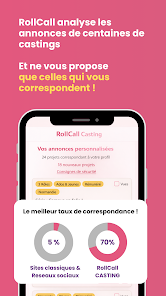

RollCall Casting & Talent connects performers, creators, and industry professionals through a mobile platform that streamlines auditions, showcases, and bookings. The app centralizes profiles, submission tools, and scheduling so talent and casting directors manage opportunities, reviews, and communications from one intuitive workspace on Android devices.
Designed for busy casting teams and independent talent, RollCall Casting & Talent replaces fragmented email chains and spreadsheets with a single hub. Users can build detailed profiles, upload reels and headshots, and browse listings organized by role, location, and pay. The architecture focuses on discoverability and clear workflows so users spend less time searching and more time auditioning or hiring.
When a casting director posts a role, the app highlights requirements and submission details. Talent can prepare a tailored package and submit directly from their profile. Casting teams receive neatly organized submissions with quick playback of reels and instant access to contact details. RollCall Casting & Talent supports blind reads, self-tape uploads, and callback scheduling to streamline each stage of casting.
The interface favors clarity and efficiency. Large thumbnails and one-tap playback make reviewing reels fast, while contextual menus surface only the controls needed for the current task. Performance is optimized for low-bandwidth scenarios; media is compressed for mobile viewing with options to download higher-resolution files when on Wi-Fi.
New users should complete their profile and add at least one high-quality reel to make a strong first impression. Use descriptive tags and accurate location data to improve match results. Casting professionals can import existing lists and set up private projects to manage separate productions or client rosters.
Actors and performers should keep reels updated with recent work and include a short custom slate to introduce themselves. Managers and agents can benefit from creating curated lists and forwarding selective submissions to clients. Use the messaging system to confirm receipt of materials and to ask concise questions about role expectations.
RollCall Casting & Talent reduces administrative friction and centralizes verifiable data, making hiring cycles faster and more transparent. Production teams appreciate the audit trail, while talent values having a searchable portfolio that matches them to relevant jobs. The app’s combination of speed, reliability, and role-specific tools helps both sides make better decisions with less overhead.
Find the app on the Android store, grant media and calendar permissions for full functionality, and consider enabling backup preferences to preserve profile content. Regularly check for updates to benefit from new casting tools and performance improvements.
Whether you’re an actor building a profile or a casting director managing dozens of roles, RollCall Casting & Talent provides a focused, modern toolkit that supports professional workflows and helps move projects from audition to hire.