Peel Universal Smart TV
Version: 2.02
26.00MB
4.4
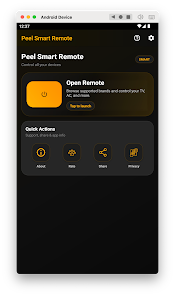
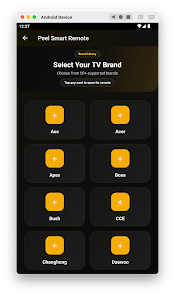
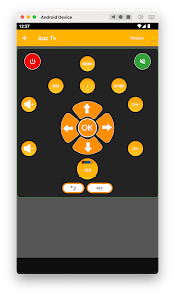
Peel Universal Smart TV turns an Android phone into a single, reliable television remote and puts commonly used controls—power, volume, channel selection and on-screen navigation—at your fingertips. Peel Universal Smart TV is designed for households that want to stop juggling multiple remotes: it pairs directly with infrared-compatible televisions to deliver a familiar button layout, numeric channel entry and quick access to menus without extra hardware or subscriptions. The app’s red-and-black dark theme and vibration feedback provide visual and tactile confirmation that help make everyday operation feel clear and responsive.
The app offers a compact navigation pad for directional control and a separate numeric keypad for direct channel entry, plus dedicated buttons for power, mute and input selection where supported by the TV model. Controls are arranged to minimize fumbling: the central navigation cluster mirrors conventional remote layouts so common tasks like opening the on-screen menu, changing channels, or adjusting volume are straightforward. Vibration feedback confirms button presses, and the dark red-and-black color scheme reduces glare in dim rooms while keeping labels legible.
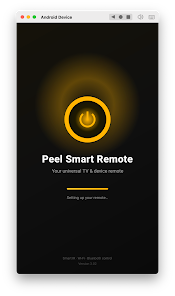
Getting started is intentionally simple: select your television brand, follow a brief on-screen pairing test and the app attempts the best matching infrared profile for basic functions. The setup process guides you through confirming power, volume and channel responses and then locks in the profile for future use. As you use the app, the saved profile eliminates repeated configuration, so the experience improves over time as your phone becomes the default remote for each TV in your home.
Peel Universal Smart TV supports multiple TV brands and makes it easy to switch between profiles for different rooms or devices. You can name and save distinct device entries so the living-room set and bedroom set are immediately accessible without going through setup again. Within each profile, the app focuses on core functions that work reliably across models; where a manufacturer offers extra or model-specific commands the app will expose those when available, otherwise the basic control set covers everyday use.
The visual design emphasizes clarity and comfortable use: large, clearly labeled buttons, a compact directional pad and a high-contrast dark theme reduce visual clutter and help you operate the TV from a distance. The aesthetic is functional rather than flashy—controls prioritize legibility and predictable placement so you spend less time searching for the right button and more time watching TV.
Because Peel Universal Smart TV communicates over the phone’s infrared emitter, the app works offline and does not require an internet connection for basic remote functions. There is no subscription or cloud dependency; once paired, the phone acts as a standalone remote. This offline reliability contributes to long-term usefulness: the app replaces multiple physical remotes and serves as a convenient fallback when original remotes are misplaced or batteries die.
The app is compatible with more than 50 TV brands including Samsung, LG, Sony, TCL and Vizio, and is most effective with sets that include an infrared receiver. It may not work with smart TVs that only accept commands via Wi‑Fi or Bluetooth, and some advanced or proprietary functions of particular models may not be available through universal IR codes. Users should check whether their TV has an IR sensor if functionality appears limited.
Peel Universal Smart TV aims to be approachable: the layout reduces complexity and vibration feedback provides an additional accessibility cue for button activation. Simple on-screen prompts guide pairing and troubleshooting, and saved profiles speed up repeated use. For situations where a specific function is missing, the app offers clear compatibility tips and testing steps so users can determine whether a limitation is due to the phone, the TV model or the absence of IR support.
If the remote commands do not respond, try re-running the pairing test, confirm the phone’s IR emitter is unobstructed and move closer to the TV’s IR sensor during setup. When a specific function isn’t available, switching between nearby remote profiles from the same brand may reveal an alternate code set that provides the missing command. Because Peel Universal Smart TV stores profiles locally, you can quickly experiment without losing previous configurations.
Peel Universal Smart TV is a practical, subscription-free replacement for multiple physical remotes, offering broad brand compatibility, straightforward setup and offline operation. Its focus on core remote functions, tactile feedback and saved device profiles makes it a useful utility for anyone looking to centralize TV control on their Android phone.