
Shielder Portaria Online
Version: 2.11
7.50MB
4.5


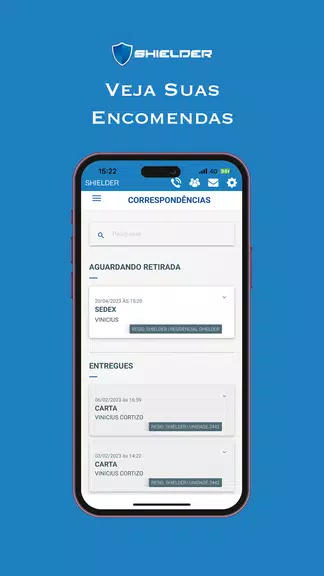
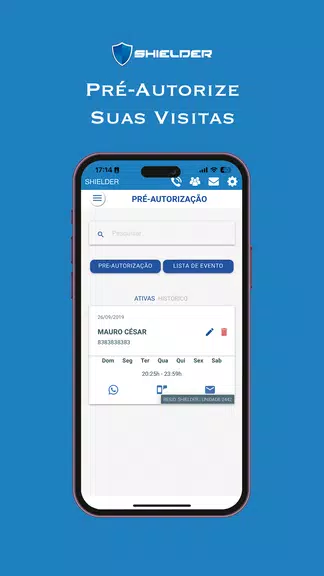
Shielder Portaria Online is a cloud-based gatehouse management app designed for condominium and corporate reception teams, streamlining visitor registration, deliveries, and access control. It centralizes guard workflows, digitalizes logs, and provides remote oversight so property managers can monitor entries, incidents, and performance without physical paperwork.
Designed for front-desk operators and security managers, Shielder Portaria Online simplifies everyday tasks with a mobile-first interface and administrative web dashboard. The app integrates visitor check-ins, resident approvals, delivery handling, and incident logging in a single place, reducing manual steps and cutting the time guards spend filling forms.
On a typical shift a guard opens the Shielder Portaria Online app, verifies a visitor’s identity, and either grants immediate access or sends a resident confirmation request. Deliveries are captured and marked as awaiting pickup, with recipients alerted automatically. If an incident occurs, the guard files a structured report that includes images and location details, making follow-up more efficient.
Administrators can configure roles and permissions, set up multiple entry points, and define approval workflows. The platform supports custom fields for visitor records, configurable notification templates, and scheduling rules to handle recurring contractors or after-hours access. These settings make it easy to adapt the system to different building policies without coding.
Shielder Portaria Online emphasizes clarity and speed. The mobile UI uses large buttons and clear labels to reduce entry errors under busy conditions. Offline support ensures basic functions continue during connectivity outages and synchronize automatically when a connection returns. Reports and logs export to common formats for auditing and record-keeping.
Data handling follows typical industry practices: role-based access controls, encrypted data transit, and audit trails for sensitive actions. Administrators can manage retention policies and export logs for compliance needs. When deploying in regions with data-protection regulations, review local requirements and configure retention and access controls accordingly.
Shielder Portaria Online also supports integrations with property management and payroll systems to reduce double entry and centralize resident information. The platform’s reporting tools help managers identify bottlenecks such as long visitor wait times or frequent delivery backlogs, enabling targeted improvements.
Teams adopt Shielder Portaria Online for its practical focus: it replaces paper logs, reduces verification friction, and gives supervisors clear visibility into operations. The combination of mobile convenience and administrative controls makes it suitable for both small residential buildings and larger commercial complexes where multiple entry points and staff shifts must be coordinated.
Install the mobile app on guard devices and create an administrator account in the web dashboard to configure properties and user roles. Import resident lists via CSV to accelerate setup. Regularly back up configuration snapshots and review user access periodically to maintain a secure environment.
For teams seeking to modernize reception operations without adding complexity, Shielder Portaria Online offers a focused toolset that balances field usability with management visibility. Its modular setup helps organizations scale usage while keeping entry procedures consistent and auditable.