Superior Nutrition
Version: 8.10.3
116.76MB
4.5
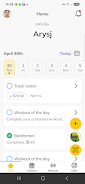
Superior Nutrition is a mobile app designed to simplify meal planning, track nutrients and support healthier habits with intuitive tools. It blends a food database, personalized targets and progress charts to help users make informed choices day to day without complex dieting jargon or time-consuming setup.
Superior Nutrition focuses on giving you practical nutrition intelligence rather than prescriptive dieting. Users can set goals for calories, macronutrients and micronutrients, log meals quickly, and view clear summaries of intake over time. The app emphasizes usability: logging takes seconds, feedback is visual, and adjustments to targets are straightforward.
Recording what you eat in Superior Nutrition is designed to be low friction. Start typing an item, pick from suggested matches, then adjust serving size with a simple slider. For repeated meals, the app stores templates and favourites so you avoid repetitive input. Each entry updates daily totals instantly and feeds into a weekly chart to highlight consistency or drift from targets.
The analysis view breaks down your intake by category and nutrient. You can toggle views between calories, carbs, protein and fat, or dig into sodium, fiber and key vitamins. Visual cues flag underconsumption or excess, enabling micro-adjustments—swap a snack here or increase protein there—without overhauling your whole plan.
Superior Nutrition uses a clean, readable interface with a neutral color palette and clear typographic hierarchy. Navigation is tab-based, with quick access to logging, progress and settings. The app is lightweight and responsive on a variety of devices; data sync is handled efficiently so your history is available across devices without noticeable lag.
Beyond targets, the app allows tailoring based on dietary preferences and restrictions. Choose vegetarian, vegan, gluten-free or other filters that affect suggestions and default portion sizes. You can also add custom foods and recipes with full nutrient profiles, making it straightforward to include home-cooked meals in your logs.
Start by setting realistic targets and logging all food for the first two weeks to establish a baseline. Use meal templates for breakfasts and lunches you repeat, and explore the analysis view weekly rather than daily to avoid overreacting to normal fluctuations. If you exercise regularly, link activity manually or via a wearable to get a fuller picture of energy balance.
Many people use Superior Nutrition as a companion to meal planning: build grocery lists based on logged recipes, or plan ahead by pre-scheduling meals. The app’s reminders are unobtrusive but effective, nudging you to log entries or re-evaluate targets when trends appear. For professionals, exported reports can support consultations with dietitians or trainers.
Users appreciate the balance between power and simplicity. Superior Nutrition presents robust nutrient data without overwhelming beginners. The customization options adapt to varied goals—weight loss, muscle gain, maintenance or improved micronutrient intake—while the fast logging and helpful visual feedback keep daily use sustainable.
Installation is straightforward through the standard app store. After download, the initial setup walks you through goal selection and dietary preferences. Data privacy is covered in-app with clear settings for export and deletion. For best results, enable background sync if you use multiple devices and consider linking a fitness tracker for automated activity adjustments.
Whether you want a simple daily log or a detailed nutritional audit, Superior Nutrition provides the tools to understand eating patterns and make incremental changes. Its balanced approach makes it useful for casual users, athletes and anyone seeking clearer insight into what they eat and why it matters.