Android Info Master
Version: 1.0.2
23.80MB
4.2

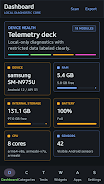
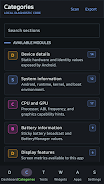
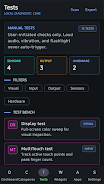
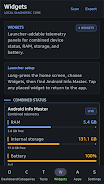
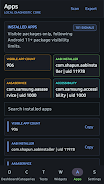
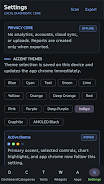
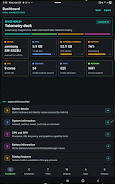
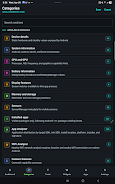
Android Info Master is a compact utility that delivers a comprehensive snapshot of your device’s hardware and software in seconds. Designed for power users and casual owners alike, it surfaces CPU, memory, battery, and network diagnostics with clear readouts and no unnecessary complexity or advertising interruptions.
Android Info Master collects device-level information and presents it in organized panels so you can quickly understand how your phone or tablet is configured. It reads system properties, sensors, storage layout, and connectivity details. The goal is straight-forward: give you accurate facts and actionable data without overwhelming menus.
Open the app and the main screen loads a concise summary panel. Tap a category to expand deep details. Most screens include copy-to-clipboard actions so you can share error reports or system specs with support services or forums. Background checks are minimal; the app requests only the permissions necessary to report each category.
The layout balances dense technical information with readable typography. Tables are avoided in favor of labeled groups and short rows that describe each property and its value. Filters let you hide fields that you already know, making it easier to focus on what changed after an update or app install.
Android Info Master was built to be lightweight. It uses low-overhead sampling for live metrics and avoids continuous background monitoring unless explicitly enabled. On mid-range hardware the app opens instantly and memory footprint remains modest, which is critical when diagnosing performance issues on older devices.
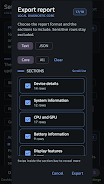
If you manage multiple devices, Android Info Master can be a reliable companion for comparing hardware revisions or troubleshooting connectivity differences. Its exportable reports are especially helpful when tracking intermittent faults across days.
Technicians, developers, and curious owners will find this tool particularly useful. Developers can confirm hardware features for compatibility checks. Support personnel get precise details to speed up troubleshooting. Everyday users can verify battery health and storage allocation without diving into developer menus.
Download and open the app, accept the requested permissions, and grant temporary access to storage if you plan to export logs. Start with the summary panel and expand into categories one by one. For advanced diagnostics, enable verbose logging from the settings menu and run tests while reproducing the issue you want to diagnose.
Android Info Master keeps essentials accessible while offering advanced options for deeper inspection. Whether you need a quick system snapshot or structured reports for technical support, it provides clear, reliable information that helps you understand and manage your Android device more effectively.