Not a Clock: Aesthetic Widgets
Version: 1.0.6
14.00MB
4.2
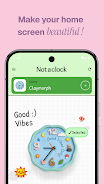
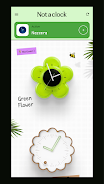
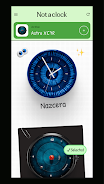
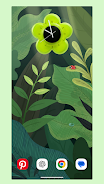
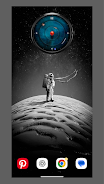
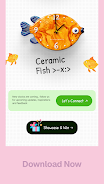
Not a Clock: Aesthetic Widgets transforms your Android home screen with minimalist, customizable time and information widgets. It prioritizes elegant visuals, low battery usage, and easy configuration. Designed for users who want refined clock designs and seamless integration, this app gives precise control over style, size, and on-tap actions.
Not a Clock: Aesthetic Widgets is a utility-focused app that replaces ordinary clock and info widgets with a curated selection of artistic, functional pieces. Instead of offering one-size-fits-all options, it emphasizes subtle animation, clear typography, and modular layouts that adapt to different launchers and screen sizes.
Widget library: A diverse set of widgets for time, date, battery, weather, and shortcuts. Each entry in the library is built with attention to spacing and contrast to remain readable at small sizes. Customization controls: Change fonts, colors, background opacity, and padding without needing a separate theme engine. Resizing and anchors: Widgets can be resized and snapped to grid or freely placed depending on your launcher.
Not a Clock: Aesthetic Widgets lets you tailor looks at multiple levels. Pick from preset palettes or create custom gradients. Adjust font weight, letter spacing, and shadow intensity for each widget element. The app also supports layered backgrounds and optional decorative accents—so you can keep a minimalist feel or build a more decorative home screen.
Widgets update efficiently: time ticks, date rolls over, and battery or weather data refresh at conservative intervals to conserve power. Tap actions are fully configurable; you can open apps, toggle system features, or trigger shortcuts. Swipe gestures vary by widget and can be assigned to different tasks for fast access to common functions.
The developers focused on smooth rendering and low memory footprint. Animations are lightweight and only active when visible. Background processes are throttled to avoid battery drain. Compatibility extends across most popular launchers and Android versions; the app detects launcher constraints and adjusts widget behavior accordingly.
The setup flow is straightforward: choose a widget, place it on your home screen, then enter the app to fine-tune properties. Presets make it easy to apply consistent styles across multiple widgets. The settings menu groups options into Appearance, Behavior, and Advanced so users can find specific controls without digging through unrelated items.
Not a Clock: Aesthetic Widgets is ideal for minimalists who want understated timepieces, creative users building themed home screens, and productivity-focused people who need compact information at a glance. It's also useful for designers who want pixel-accurate alignment and control when arranging elements on larger displays.
Feedback commonly highlights the app's polished visuals, predictable performance, and depth of customization without clutter. Many users prefer it as an alternative to heavier widget suites because it concentrates on essentials: style, precision, and responsiveness.
Install, grant necessary permissions for widget functionality, then add a widget via your launcher. Open the app to customize and save presets. Regular updates introduce subtle style additions and compatibility improvements, so check the changelog to discover new widget designs and features.
Not a Clock: Aesthetic Widgets offers a focused approach to home screen personalization, blending aesthetics with practical controls so your device reflects your taste while remaining efficient and unobtrusive.