
Fuel Insight
Version: 1.0.3
31.00MB
4.3

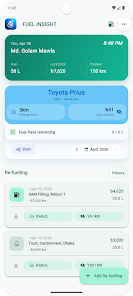
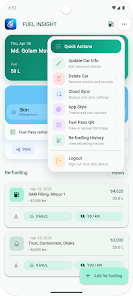
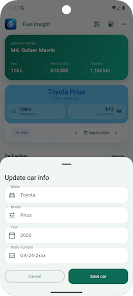
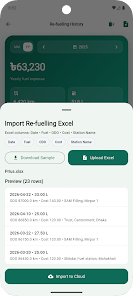
Fuel Insight is a straightforward fuel logging app designed for drivers who want an uncluttered way to record every refuelling, track running costs and monitor vehicle efficiency. Fuel Insight places quick data entry and clear summaries at the center of the experience so you can add a fill-up, review costs or check month‑to‑month trends without digging through menus.
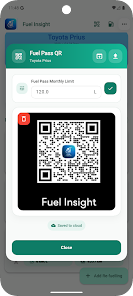
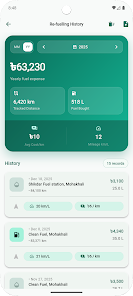
The app lets you record fill-ups and odometer readings, calculates average kilometres per litre and cost per kilometre, and compiles consolidated monthly and yearly histories for easy comparison. It supports multiple vehicle profiles so you can keep separate records for family cars, work vehicles or fleet units, and it stores Fuel Pass QR details so the card or QR code is always available at the pump. A built-in Fuel Pass monthly limit lets you set and enforce an allowance, see remaining allowance at a glance, and pair that with the historical data to manage budgets more accurately. You can import past records from Excel for a quick start and keep everything in sync across devices using the app’s secure synchronization option.
Key features are presented as functional tools rather than promotional items: a simple add‑refuel form captures date, volume, cost and odometer reading; automatic calculations produce km/L and cost/km; history views show aggregated totals by month or year; and stored Fuel Pass information is available for quick reference. The layout is intentionally minimal so common tasks — adding a refuelling, checking a vehicle’s recent efficiency or exporting a period of data to Excel — require few taps. These features combine to make routine tracking fast and reliable for drivers who record data frequently.
Controls follow typical mobile patterns with labeled input fields and an accessible quick‑add button for immediate logging. Forms are compact and validation helps avoid obvious data mistakes such as reversed odometer or decimal errors. The app favors clarity: important calculations and remaining allowances are shown near the top of vehicle summaries, while longer charts and tables are available one tap away. This keeps core controls familiar and reduces the learning curve for users moving from paper logs or spreadsheets.
Rather than a progression system like a game, Fuel Insight offers steady value through ongoing data accumulation and analysis. As you add entries the app reveals trends in fuel efficiency and spending so you can spot gradual changes, seasonal variations or maintenance‑related drops in performance. Monthly and yearly comparisons act like a progression metric: the more consistent your logging, the clearer the trendlines and the more actionable the insights become for budgeting and preventive maintenance planning.
The interface focuses on readability and offers dark and custom theme options to suit different lighting conditions and personal preferences. Text sizes and contrast are chosen to help users who prefer larger fonts or clearer charts, and color choices aim to distinguish key metrics without clutter. Per‑vehicle naming and notes let you attach context to entries, and display options let you focus on either compact lists or expanded history tables depending on how you like to review records.
Fuel entries can be created without an active internet connection and sync when the device is online, so you can log fill‑ups at remote stations and keep a continuous record. Secure synchronization maintains consistency across multiple devices registered to the same account, and Excel import/export makes it straightforward to migrate existing records or create backup copies. These tools support a workflow where offline convenience and cloud continuity coexist without forcing constant connectivity.
There are a few trade‑offs to consider. Most entries require manual input at each fill‑up unless you prepare and import a compatible Excel file, so users who expect fully automated capture from pumps will need to accept some routine typing. Fuel Pass features are valuable only if you actually use a Fuel Pass system; meanwhile Excel import can require compatible formatting of historical spreadsheets to ensure a smooth transfer. The app emphasises reliability and clarity rather than experimental automation, which suits users who prefer control over black‑box synchronization.
If you want a focused tool for tracking fuel usage, comparing monthly costs, and managing a simple Fuel Pass allowance across several vehicles, Fuel Insight provides a clean, dependable experience that improves the utility of everyday fuel records while keeping data accessible and portable.