CREWLINE
Version: 1.2.1
59.94MB
4.2


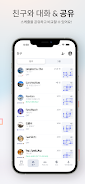
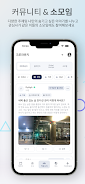

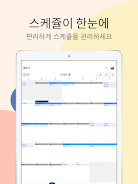
CREWLINE is a work-support mobile app tailored for airline crew that centralizes schedule management, crew communication and travel-related resources into a single, practical tool. CREWLINE helps crew members view and organize flight rosters, check duty periods, compare schedules with colleagues and keep important location notes and personal preferences in one place. Because CREWLINE operates independently, it is not affiliated with any airline or government organization, and it is designed to be a straightforward companion for professional use before, during and after duty.
The app is organized into clear modules that reflect typical crew workflows: Roster, Compare, Messages, Saved Places and Profile. These modules create a predictable level structure so users can quickly move between viewing a full month roster, opening a single duty for details or accessing a community board for tips. Controls are intentionally simple: tap to open a roster entry, swipe to move between days, long-press to flag an item, and use pull-to-refresh for the latest updates. These basic gestures keep the learning curve low and let crew members operate the app with minimal distraction while on the move.
Schedule management in CREWLINE focuses on practical progression rather than game-like systems. As users interact with the roster and refine profile preferences, the app becomes more tailored to their routines: favorite routes and frequently used hotels appear sooner in searches, saved place templates speed up note-taking, and preference settings adjust default view filters. This gradual personalization reduces time spent on routine tasks and supports an efficient day-to-day workflow. CREWLINE also highlights potential scheduling conflicts or overlapping duties so crew can review and resolve problems early.
The schedule comparison feature enables side-by-side and overlay views so crew members can coordinate swaps, rest periods and shared duties without exchanging multiple messages. CREWLINE’s crew chat and community boards are built for practical information exchange: users can post pinned messages about terminal changes, local amenities or staff travel tips, and follow threads that matter to their base. Chats are organized by conversation and recent activity, and messages are designed to be concise and searchable to support quick reference during down-time.
Saved places let crew store hotels, terminals, crew rooms and other frequently used locations with custom notes and contact information. These items act like a personal reference list that speeds planning and reporting. CREWLINE also supports offline access to essential data: roster snapshots and saved places remain available when connectivity is limited, and any changes made offline are queued and synchronized automatically when the device reconnects. This offline-first behavior ensures reliability during layovers or in areas with poor reception.
CREWLINE offers personalization through profile and preference settings so users can adapt the interface to their needs. Options include adjustable font sizes, a contrast-friendly color palette and compact or expanded roster views to accommodate different screen sizes and viewing preferences. The visual style emphasizes clarity and legible typography to reduce fatigue. Accessibility features such as screen reader labels on core controls and large touch targets help crew members with varied needs interact confidently with the app.
Daily use of CREWLINE is intended to reduce friction around routine tasks: quick roster checks, fast coordination with colleagues, and instant access to travel notes. The app streamlines common operations so crew can focus on duty rather than administrative details. Regular updates to saved templates and preferences produce an observable improvement in efficiency over time, encouraging repeated use and making the tool more valuable the more it is used.
As an independent application, CREWLINE stores profile and preference data locally with options for secure synchronization. The app is designed to be a practical, third-party companion rather than an official airline system; users should continue to follow employer rules and official notices. CREWLINE’s approach is to provide useful, private tools that help crew stay organized while respecting user control over their information.