Friendsbook
Version: 1.0.0
176.63MB
4.1





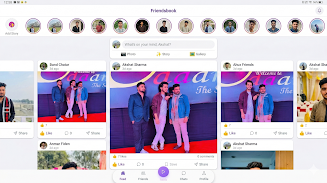
Friendsbook is an all-in-one social app that brings messaging, sharing and short video discovery together in a single, simple interface. Friendsbook is designed for people who want to chat with friends, publish photos and stories, and watch short reels without switching between multiple apps, combining real-time messaging, a feed for updates, and built-in tools for creating bite-sized videos. The app emphasizes straightforward navigation and control over your audience so you can focus on meaningful conversations and expressive posts rather than endless scrolling.
The app provides real-time chat for one-to-one and group conversations with text, images and basic file sharing, so conversations feel immediate and familiar. A central feed aggregates posts and stories from your network with chronological and interest-based sections to help you catch up quickly. The short videos section includes a simple camera interface with trimming, basic filters, and the ability to add captions or background audio from your device; creators can save drafts and publish when ready. Discovery tools make it easy to find new people and topic-based collections without exposing you to broad public promotion unless you choose to. Privacy controls let you set audience limits for posts, approve followers, and manage who can message you.
Navigation is gesture-friendly: swipe between the feed, messages and the camera, tap to open full posts, and long-press to preview content. Posting follows a three-step flow—capture or upload, edit and add context, then choose visibility—so even new users can publish confidently. Messaging uses familiar controls like threaded replies, attachments, and simple search through conversations. The video editor is intentionally lightweight: trim clips, apply one-touch color filters, add captions, and adjust volume levels. Notifications are customizable so you only get alerts for the activity that matters to you.
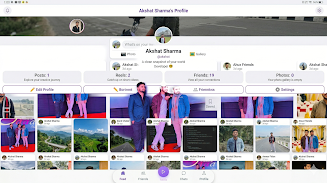
Progression in Friendsbook is rooted in content and connection rather than competitive leaderboards. As you publish more posts and interact with others, your profile naturally reflects activity through follower counts, saved posts, and visit history so you can track what resonates. The app supports replay value by making it easy to revisit saved drafts, re-share older posts, and follow topic streams that refresh with new short clips daily. Community-driven prompts and creator trends encourage regular participation without forcing attention-seeking behavior.
Friendsbook favors a clean, minimal visual style that prioritizes user content: large thumbnails, legible typography, and a compact composer bar. You can personalize your profile with a bio, cover photo and pinned posts to highlight what’s important. Display options include adjustable text size and a dark mode to match your device preferences. The composition tools focus on essentials so creators can produce engaging clips quickly without navigating deep menus.
Accessibility features include readable contrast, scalable text, and optional captions for videos to help users with hearing or vision needs. The app caches recently viewed feed items for limited offline viewing and allows you to save post drafts while offline; drafts sync when you return online so work is never lost. Basic image descriptions and label hints are used throughout the interface to make navigation easier with screen readers.
Rather than formal gamification, Friendsbook encourages ongoing creativity through optional weekly prompts and community themes that are presented in the discovery section; participation is voluntary and designed to inspire new content ideas. The app also offers contextual tips for safer sharing and reminders about privacy settings when you prepare a public post, helping creators make informed choices about audience and content visibility.
Friendsbook delivers a unified experience that removes the need to juggle multiple social apps, with a straightforward layout that keeps navigation predictable and approachable. It performs well on a wide range of devices and emphasizes privacy controls so you can manage who sees your content. Trade-offs include a learning curve for new users exploring all the creation and discovery options, and because it aims to be versatile, some specialized tools found in single-purpose apps may be more advanced elsewhere. For many users, the balance of messaging, feed, and short-video creation in one place offers a convenient, focused social experience.