Modoo File Converter
Version: 1.0.5
14.00MB
4.4
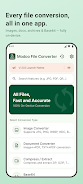
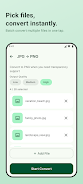
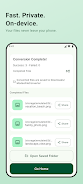

Modoo File Converter is a compact, privacy-minded utility that performs file conversions entirely on your Android device, avoiding uploads to external servers and keeping your documents, images and archives local. The app targets everyday productivity: convert HEIC photos to JPG, merge images into print-ready PDFs, export office files to portable formats and compress or extract archives without requiring an account or network permissions. The introduction below explains how the app organizes tasks, what controls are available, how you build repeatable workflows, and what to expect in real-world use.
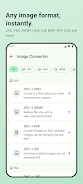
The converter handles common image types such as JPG, PNG, WEBP, HEIC (Android 10+), BMP, GIF, TIFF and SVG, and lets you create multi-page PDFs from selected pictures. Document support covers PDF, DOCX, XLSX, PPTX, TXT, Markdown and HTML with options to extract images from PDFs or export slides and documents to other formats. Archive operations include ZIP, 7Z, TAR, TAR.GZ and GZIP with both extraction and compression modes; a 7Z high-compression option and batch compression make the app useful for managing storage and preparing attachments for sharing through other apps.
The user interface emphasizes direct touch controls and predictable dialogs: pick files through the Android file picker, use the system share sheet to send content into the converter, or long-press items inside the app to enter multi-select for batch operations. Conversion dialogs surface the most relevant controls for each task—output format, destination folder, image quality or archive compression level—while progress bars and notifications keep you informed during longer jobs. Context actions such as rename, open with and share are available from the file view so results are easy to handle immediately after conversion.
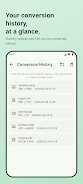
Rather than game-like levels, the app supports a productivity progression model: you increase efficiency by saving export settings and relying on a searchable conversion history. Templates allow you to capture a sequence of options—for example, convert a camera roll to JPG at a specific quality and then bundle into a PDF for archiving—and reuse that template to repeat the same multi-step workflow with minimal taps. Background processing and a queue let you schedule larger batches and return later when results are available in your Downloads folder.
The interface favors clarity over decoration: compact layouts with adjustable font sizes, a system-aware dark mode and clearly labeled controls reduce errors when choosing output options. Accessibility considerations include larger touch targets, clear semantic labels for screen readers and compatibility with Android accessibility services so users who rely on assistive technologies can navigate conversion tasks. Language support includes both Korean and English, and visual contrast and spacing choices aim to make the app comfortable on small phones and larger tablets alike.
All conversions run locally, which reduces latency and removes the need to upload large files, but it also means performance will depend on your device hardware and battery state. For best results, process very large archives or multi-megapixel image batches in smaller chunks on older devices, monitor battery usage for prolonged jobs and allow the app time to complete background tasks. HEIC decoding requires Android 10 or later; otherwise, the app will gracefully fall back to supported formats where possible.
There are a few practical limits to keep in mind: no cloud or server-based processing is provided, so remote offloading isn’t an option for heavy, centralized conversions. Save templates and use the conversion history to rerun successful settings, and split very large batches to prevent memory pressure. By default converted files go to Downloads/ModooFileConverter for consistent retrieval and you can change destinations in the conversion dialog. A single in-app purchase removes ads for a cleaner interface if you prefer uninterrupted background work.
Modoo File Converter is designed for people who need fast, private conversions on the go: photographers preparing images for web or print, office workers exporting reports to portable formats, and anyone who wants control over compression and output quality without sending files to third-party servers. The combination of touch-friendly controls, reusable templates and offline reliability creates real replay value for routine tasks and reduces time spent repeating manual steps.