Huey
Version: 1.0.0
109.11MB
4.5
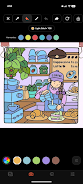
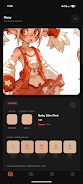
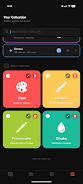
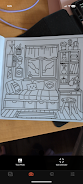
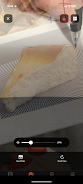
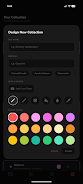
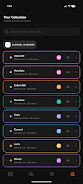
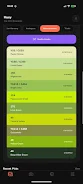
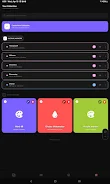
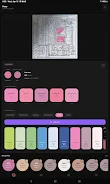
Huey is a mobile creative utility designed for artists who work with physical media and want reliable digital color control. Huey helps you capture colors from paints, pencils and markers, extract accurate palettes from photos, preview color choices on-screen before committing to paper, and store organized swatches for later use. The app centers on reducing waste and uncertainty by letting you test combinations digitally and by offering tools that translate real-world pigments into usable color references.
The app includes an AR Trace Camera that projects reference images over your workspace so you can trace and compose directly on paper, and a precision color picker that samples exact hues from photographs and camera input. Huey supports many popular marker sets such as Ohuhu, Arrtx, Copic, Caliart, Decotime and Bianyo and gives you the option to create and name your own sets. You can snap a photo of a swatch strip or a finished test and build a palette in seconds, then preview that palette on templates or imported line art to see how values and saturation interact before using physical supplies.
Controls are gesture- and touch-driven to keep your hands free while you work: tap to sample, pinch to zoom when sampling details, drag swatches into a palette, and use sliders to nudge hue, saturation and value for calibration. Camera settings are integrated so you can lock exposure or tap to focus for more consistent captures under studio lighting. Huey’s workspace is project-based: create a project for each piece, attach palettes and reference photos, and return to refinements later without losing earlier versions.
Huey emphasizes accurate color extraction by offering both automatic sampling and manual calibration. Automatic extraction evaluates a selected area and suggests representative swatches, while manual calibration lets you adjust white balance and compare numeric color values in common color spaces. The app displays RGB and hex values alongside visual swatches so you can reproduce colors across tools and document choices for client work. For best results, use consistent lighting or the built-in exposure lock before sampling.
Rather than levels, progression in Huey is organized around projects and skill development. As you build a library of palettes and projects, you can track how your color decisions evolve, create versioned palette snapshots, and reuse successful combinations in future pieces. The app encourages iterative practice: test a palette, apply it in a quick study, evaluate results, then refine the palette. Over time this system helps you build a dependable collection of swatches that match the materials you actually own.
Huey’s interface is intentionally minimal and color-forward so the visual elements in your work remain the focus. Large swatches, uncluttered preview modes, and adjustable contrast settings make it easy to judge hue relationships at a glance. The AR Trace Camera overlays are semi-transparent and adjustable so they don’t obscure subtle marks on paper. Previews include flat and simulated textured backgrounds so you can get a realistic sense of how colors interact with different surfaces.
Customization centers on palettes and calibration profiles: rename palettes, group swatches into sets, and save per-project calibration presets if you switch frequently between indoors and outdoors lighting. The app accepts photos from your camera roll and camera captures, and you can export palette images for reference or to attach to project notes. Huey is compatible with a wide range of modern Android devices and adapts its camera options based on available hardware.
Huey includes accessibility-minded options such as larger swatch tiles, numeric color readouts for precise communication, and high-contrast UI choices for visibility. Most core features work offline: you can capture swatches, assemble palettes, and use the AR Trace Camera without a persistent Internet connection, which makes the app reliable in studio or travel situations where connectivity is limited.
Artists will find Huey useful for test runs, client color approvals, and building consistent color libraries across mixed-media projects. Replay value comes from the iterative nature of creative work: palettes evolve, projects accumulate, and everyday practice with the sampling and calibration tools improves color-matching confidence. For better accuracy, photograph swatches in consistent light, use the exposure lock when sampling, and create a calibration swatch to reference across sessions.
Not every marker or paint brand is preloaded, so some sets require manual creation, and precise matching can take time and user input to calibrate for specific lighting and materials. Built by an artist for artists, the developer continues to refine Huey based on user feedback with the goal of making real-world color decisions faster and more reliable for studio and on-the-go workflows.