Phone Cleaner
Version: 1.1.1
11.36MB
4.2


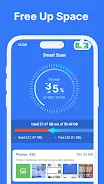
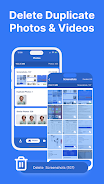
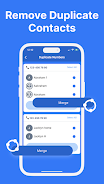
Phone Cleaner is a compact utility designed to reclaim storage and keep your Android device running smoothly by removing duplicate media, clearing temporary junk, and tidying contacts. Phone Cleaner puts core cleanup tools in one place and starts with a simple scan and one-tap cleanup so you can quickly see how much space can be recovered and which items will be affected before you confirm any action.
The duplicate photo and video scanner compares images and clips using content similarity checks and file metadata to group likely duplicates. Scans present a preview of matches so you can manually review and select which copies to delete; this helps avoid accidental removal of edited or important files. The media cleaner also highlights high-resolution duplicates and visually similar bursts so you can decide what to keep.
Phone Cleaner’s junk file cleaner identifies temporary files, residual caches, app installation files left behind, and other nonessential data that accumulates over time. The interface separates categories and provides estimated space savings for each group, allowing you to clear everything with one tap or drill down into individual files for selective removal. Progress indicators show how the cleanup is proceeding and how much storage has been reclaimed in each session.
Contact management focuses on merging duplicate or near-duplicate entries while preserving distinct numbers and labels. Before any merge, Phone Cleaner displays the differences between contact cards and asks for confirmation. This reduces the risk of merging unrelated contacts that share similar names. The app also supports undoable previews and clear warnings when a merge is about to change multiple fields.
The built-in VPN is offered as a basic privacy layer for use on public Wi‑Fi and other untrusted networks. The VPN gives a straightforward list of server options and a single-switch control to connect or disconnect. It is intended to add convenience and a degree of anonymity for casual browsing, not to replace specialized enterprise security tools or comprehensive privacy services.
Controls are intentionally simple: a primary Scan button starts analysis, on-screen toggles let you switch between quick and deeper scan modes, and one-tap cleanup executes user-approved removals. For hands-on users, long-press and multi-select gestures allow granular control over media and contact actions. Each cleanup session shows a short log and a storage-progress bar so you can track improvement over time and decide when to repeat maintenance.
Rather than gamified progression, Phone Cleaner emphasizes visible, practical results: each session shows exact storage reclaimed and a session timestamp, building a straightforward history you can review. This history helps you pace maintenance—running a brief quick scan before installing a large app, or a deeper scan when you want to free up significant space.
The visual style is clean and minimalist, with clear icons, readable typography, and contrast settings that make important actions obvious. Phone Cleaner supports light and dark themes and gives basic customization such as excluding folders from scans and choosing how aggressively duplicates are matched. Accessibility considerations include scalable text sizes and compatibility with screen readers to make navigation easier for users who rely on assistive technologies.
Most cleaning functions operate locally on the device and do not require an internet connection. The VPN feature, of course, requires network access to function. Cleaning operations typically require permissions to access files and contacts; the app explains why each permission is needed and prompts for consent during initial setup. Because file deletions and merges can be irreversible, Phone Cleaner warns users and recommends backing up important data before major cleanups.
Routine maintenance provides the primary replay value: running scans periodically keeps storage optimized, and selective cleanups prevent slowdowns caused by bloated caches and duplicates. The app emphasizes reliability through clear confirmation dialogs, preview screens, and a modest session log so users can verify changes. If you need help, in-app guidance and basic troubleshooting tips point you toward safe ways to recover or avoid unintended edits.
Phone Cleaner requires permissions to scan files and contacts to perform its tasks, and the VPN offers basic protection rather than complete anonymity. Users who require advanced security or enterprise-grade privacy should combine this tool with dedicated security solutions. For everyday device maintenance, Phone Cleaner provides a practical, easy-to-use option to free space, organize media and contacts, and add a convenient privacy feature without switching between multiple apps.