Floor Plan CAD - 2D 3D Design
Version: 1.2.0
36.84MB
4
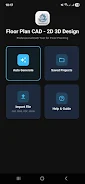

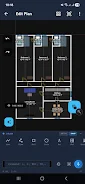
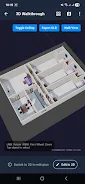
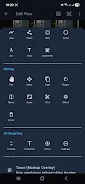
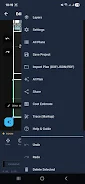
Floor Plan CAD - 2D 3D Design puts desktop-class CAD and floor‑plan tools on your Android device, letting architects, students, designers and homeowners draft precise plans, generate furnished layouts and preview realistic 3D walkthroughs. The app combines a full set of drawing and editing commands with an AI floor‑plan generator and voice control so you can create or edit projects quickly without a complex desktop setup. If you need accurate measurements, multi-floor support and export options such as DXF, PDF and GLB, Floor Plan CAD - 2D 3D Design provides powerful, free mobile design tools for planning new builds or renovations.
⭐ Floor Plan CAD - 2D 3D Design offers comprehensive CAD drawing tools including lines, polylines, arcs, splines, trim/extend, offset, fillet/chamfer, precision coordinate entry and multi-layer management.
⭐ AI-powered floor plan generator and room editor with drag-and-resize room snapping, door/window/stair catalog and a furniture palette for quick layout creation.
⭐ Voice commands let you add rooms, move elements, rotate objects and perform common edits hands-free for fast iteration.
⭐ Import and export support for DXF, DWG (via cloud conversion), PDF vector extraction, OBJ for 3D viewing and JSON for project backups.
⭐ Instant 2D to 3D switching with interactive walkthroughs, hideable ceilings for top-down interior views and GLB export for models.
⭐ Built-in construction cost estimator with automatic area calculation and tiered material estimates (Economy/Standard/Premium) and Indian currency formatting.
✅ Floor Plan CAD - 2D 3D Design delivers precision CAD functionality on mobile, so you can produce accurate plans without a full desktop CAD system.
✅ Broad file compatibility (DXF, PDF, OBJ and JSON) simplifies collaboration and sharing with consultants and contractors.
✅ AI tools and one-tap auto-furnish speed up the layout process and help produce presentable plans quickly.
✅ 3D visualization and walkthroughs make it easy to validate circulation, sightlines and furniture placement before implementation.
✅ The app is free to use with no subscription, making it accessible for students, DIY renovators and small design teams.
❎ Native DWG support requires cloud conversion, so working with DWG files may involve an extra online step.
❎ 3D export is currently limited to GLB format, which may require conversion for some pipelines.
❎ Some desktop-style shortcuts and precision features are most convenient with a keyboard or in desktop mode, which can be less efficient on smaller phone screens.