OnlyT Remote
Version: 1.6.0
20.00MB
4.5
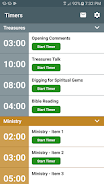
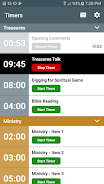
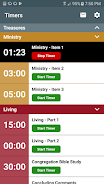
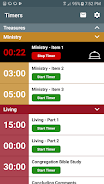

OnlyT Remote provides a simple remote control interface for timers running in OnlyT on a connected computer, allowing an operator to start, pause, stop and reset timers from a mobile device while displaying current time and basic status.
With OnlyT Remote you can start, pause, stop and reset the active timer with a single tap, view timer status and remaining time at a glance, and use secure pairing by entering the code shown by OnlyT on the host computer. Commands are sent with low latency over the local network to keep timing reliable during services and presentations.
OnlyT Remote requires OnlyT on the host computer with remote access enabled and both devices to be on the same local network; no cloud account is required and all communication stays within your network.
Enable remote control in OnlyT on the computer, note the pairing code, open OnlyT Remote on your device, enter the code and connect; once paired, use the on-screen controls to manage timers during rehearsals or live services.