Blurrr-Capcut pro video editor
Version: 0.9.0-4
91.80MB
4.3


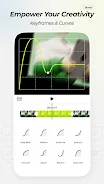
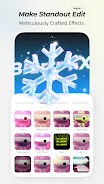
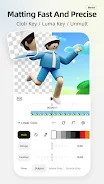
Blurrr-Capcut pro video editor is a professional-grade video editing app that brings powerful tools and creative features to your fingertips. With its user-friendly interface, this app allows both beginners and experienced editors to create stunning videos with ease. Whether you're editing a vlog, short film, or social media content, Blurrr-Capcut Pro offers everything you need, from advanced effects to customizable transitions. The app is designed to provide high-quality edits with minimal effort, making it the perfect choice for anyone looking to enhance their video content.
1. Advanced Editing Tools: Blurrr-Capcut Pro offers a full suite of editing features, including trimming, cutting, splitting, and speed control, allowing for precise video adjustments.
2. Stunning Filters and Effects: Enhance your videos with a variety of high-quality filters and special effects, such as glitch, retro, and cinematic looks, to give your content a professional edge.
3. Text and Stickers: Add dynamic text, captions, and animated stickers to your videos to make them more engaging and informative. Customize the font style, size, and color to match your content.
4. Transitions and Animations: Create smooth transitions between clips with a wide range of animations that enhance the flow of your video, giving it a polished, cinematic feel.
5. High-Resolution Export: Blurrr-Capcut Pro allows you to export your videos in high resolution, ensuring that your final product looks sharp and professional, perfect for sharing on social media.
1. Master the Timeline: Use the timeline feature to arrange your clips in the desired sequence. Pay attention to the spacing between clips to ensure smooth transitions and flow.
2. Experiment with Effects: Try out different filters and special effects to see how they change the mood of your video. Experimentation can lead to unique and eye-catching results.
3. Use Keyframes for Precision: To create smooth animations or adjust clip properties (like size or position), use keyframes. This feature lets you control the exact timing and movement of your edits.
4. Add Music and Sound Effects: Enhance the atmosphere of your video by adding background music or sound effects. Blurrr-Capcut Pro allows you to sync your audio perfectly with your visuals.
5. Preview Your Edits: Always preview your video before exporting to make sure the transitions, effects, and timing are just right. Make any necessary adjustments for a flawless final product.
Blurrr-Capcut pro video editor is a versatile and powerful app that provides all the tools you need to create professional-quality videos. With its wide range of editing features, stunning effects, and easy-to-use interface, it’s perfect for both beginners and advanced video editors. Whether you're creating content for social media, professional projects, or personal videos, Blurrr-Capcut Pro makes it simple to achieve high-quality results. Download Blurrr-Capcut Pro today and start turning your video ideas into reality.