
GoMovies
Version: 1.0.0
48.27MB
4.2
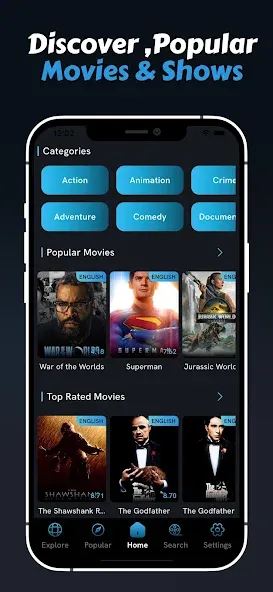

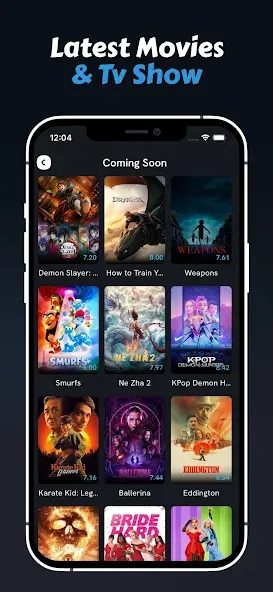
GoMovies is a mobile streaming companion that organizes movies and TV shows, offering offline downloads, multi-source search and personalized watchlists to help you find content fast. It combines a minimalist player, subtitle support and curated recommendations so users can browse, queue and watch with minimal setup.
Designed for viewers who want quick access to a wide selection without clutter, GoMovies acts as a central hub for discovering and consuming on-demand video. The app aggregates listings, tracks viewing progress, and adapts suggestions to your history so new titles surface over time. It balances discovery tools with lightweight playback features to keep battery and data use reasonable.
Using GoMovies is straightforward: search by title, genre or cast, then review available streams and metadata. Tapping a result brings up details such as synopsis, release year and runtime. From there you can play immediately, add to a watchlist, or download for offline viewing. The app keeps a simple timeline so you can pick up where you left off across sessions.
The recommendation engine blends recent activity with category popularity and user-specified preferences. Over time, the app prioritizes directors, genres and actors you watch most frequently. Curated sections rotate weekly, highlighting seasonal picks or hidden gems to encourage exploration beyond familiar titles.
GoMovies opts for a clean, low-friction interface focused on thumbnails and readable typography. Navigation uses a bottom bar for quick access to Home, Search, Downloads and Library. The lightweight design reduces load times and keeps animations subtle to conserve device resources.
The built-in player supports multiple audio tracks and external subtitle files. Playback controls remain accessible while watching, and the app offers options for adjusting streaming quality to manage data consumption. For users who prefer a more immersive experience, a dark theme and full-screen mode minimize distractions.
Settings let you fine-tune how content appears and behaves. Choose default streaming quality for Wi-Fi and cellular, set automatic downloads for new episodes in a series, and toggle notifications for new arrivals. Users can also switch subtitle languages and alter font sizes to improve readability.
Start by building a small watchlist to train the recommendation system quickly. Use the search filters to narrow results by year or genre and compare streams before selecting the highest-quality source. If storage is tight, enable lower resolution for cellular downloads and reserve high-definition files for Wi-Fi.
For the best balance of quality and space, set downloads to medium quality and remove watched titles regularly. Keep the app updated to benefit from performance patches and codec improvements. When subtitles are out of sync, the player provides manual offset controls to correct timing on the fly.
Installation is simple: download the package, grant the necessary permissions for storage and network access, then sign in or use the app anonymously. Initial setup prompts you to pick favorite genres and opt into notifications; this step accelerates relevant recommendations from the first session. For privacy-conscious users, the app stores preferences locally and provides options to clear activity history.
Many people appreciate GoMovies for its speedy search, practical download tools and uncluttered interface. Whether you want to queue episodes for a commute or keep a compact offline library, the app prioritizes usability. Regular updates refine streaming reliability and expand source coverage, keeping the experience fresh without overwhelming the interface.