
PixelChat
Version: 4.8.5
137.61MB
4.5


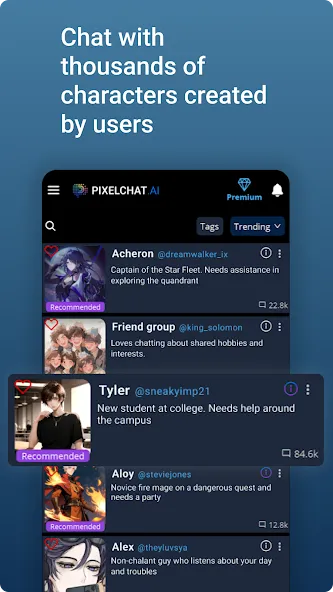

PixelChat is a modern messaging app built for quick, secure conversations across devices, combining real-time text, voice, and file sharing with privacy-focused features. It streamlines communication for both casual chats and team coordination while keeping controls and customization accessible for every user.
PixelChat centers on a concise set of tools that make messaging efficient and versatile. Text conversations support rich formatting, inline previews, and message reactions. Group chats can be organized into topics or channels, with threaded replies to keep discussions focused. Built-in voice notes and one-tap video calls let conversations switch mediums without leaving the app. File transfers include automatic resizing for images and resumable uploads for large documents, plus a dedicated media tab for quick access.
The interface uses a familiar list-and-pane layout that reduces friction when managing multiple conversations. A left-side navigation shows pinned chats, recent activity, and search, while the main pane presents the selected conversation with message history and quick actions. PixelChat’s search is fast and supports filters by date, sender, or file type, improving retrieval in busy workflows. Keyboard shortcuts and gesture controls speed up navigation on desktop and mobile, respectively.
Privacy is a prominent part of PixelChat’s design. End-to-end encryption is offered for one-on-one and optional for group chats, ensuring messages are unreadable on the server. Local passcodes, biometric unlock, and ephemeral messages let users tailor their privacy level. PixelChat also logs minimal metadata and includes an audit section where you can review active sessions and revoke device access with a single tap. Users can manage contact permissions for file sharing, location requests, and notifications.
PixelChat provides various ways to personalize the experience. Choose from multiple themes, adjustable text sizes, and customizable chat backgrounds. Stickers, emoji packs, and message reactions can be organized into favorites for frequent use. For teams, PixelChat supports role-based access in channels and custom notification rules so that important updates stand out while lower-priority threads stay quiet.
To extend functionality, PixelChat includes a lightweight integration framework. Connect calendars, task managers, cloud storage services, and third-party bots to automate reminders, file archival, or simple data lookups. Webhooks and an API endpoint make it possible to route system alerts or CI notifications into dedicated channels. The app also supports scheduled messages and workflow templates for recurring coordination tasks.
PixelChat is optimized to perform well on varying network conditions. Messages and media sync incrementally so that large histories do not block the UI. Offline mode caches messages and queues outgoing content until a connection is restored. Cross-platform clients for Android, iOS, macOS, Windows, and web ensure conversations follow you. The app uses low-bandwidth protocols for voice and video calls to preserve quality on constrained connections.
Onboarding in PixelChat is straightforward: create an account with phone number or email, choose a display name, and import contacts or join via invitation links. New users are guided through core actions—starting a chat, creating a channel, and initiating a call—via contextual tips that fade away once familiar. For teams, admin tools allow bulk invites and workspace configuration to get a group ready to collaborate in minutes.
PixelChat blends speed, privacy, and flexibility for both personal and professional communication. It offers enough structure to support team workflows while staying approachable for everyday conversations. With responsive clients, robust privacy options, and extensible integrations, PixelChat aims to be a single hub for the diverse communication needs of modern users.