Vont
Version: 0.4.32
97.40MB
4.4
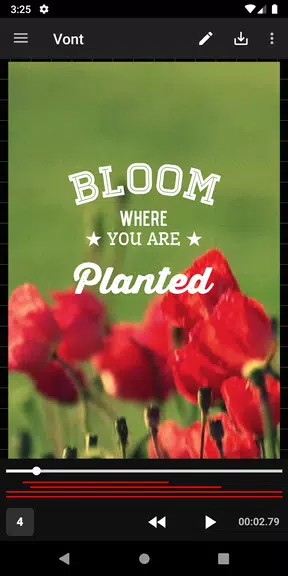
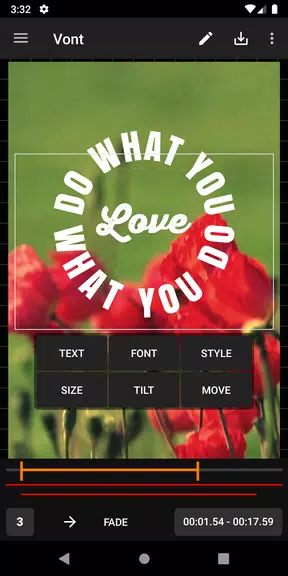
Vont is a lightweight Android app for adding clear, stylish text to photos and videos quickly and with precision. Built for creators who need fast, predictable results on a phone or tablet, Vont pairs a touch-friendly editor with a broad font collection, timing controls for simple motion, and export options tuned for social sharing and basic editing pipelines.
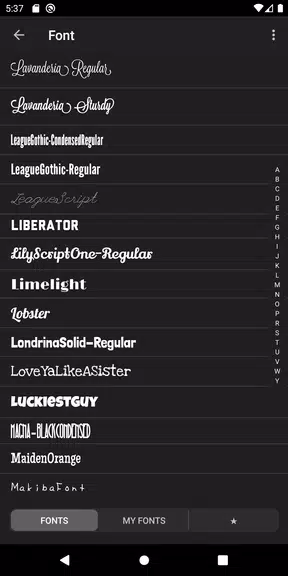
The app focuses on the essential tools you use most when overlaying words on visual media. Fonts span modern sans to classic serif, script and display faces, and each type includes size, tracking, kerning and line-height controls for tight layouts. Color pickers include opacity, swatches and simple contrast helpers; stroke, outer and inner shadow options increase legibility on busy footage; and background shapes or texture overlays let you create short lower-thirds or branded cards. Animation presets provide tasteful entrance and exit motions that can be adjusted for duration and easing, and commonly used combinations can be saved as reusable style presets to accelerate recurring projects.
The interface is arranged to reduce steps from idea to result. A compact toolbar gives one-tap access to fonts, size and alignment, while touch gestures—drag to position, pinch to scale and quick taps to open style controls—feel natural on Android screens. Layer ordering and an undo/redo history keep edits non-destructive; a simple timeline lets you set in/out points for each text element so they appear at precisely the right moment. These controls support a progression from quick edits for social clips to more complex title sequences as your comfort with the app grows.
Typography is treated as a craft: the font library and styling controls are designed to let you refine hierarchy and clarity. Use bold or condensed weights for headlines, lighter styles for captions, and baseline shift for fine vertical alignment. Outlines, inside shadows and background panels improve readability without obscuring imagery. The preset system helps you lock in a visual identity across multiple videos, and the export of PNG stills with transparent backgrounds supports compositing in other editors when needed.
Motion is offered as a set of subtle, performance-conscious presets intended to enhance legibility rather than distract. Timers let you set precise in/out durations and delays, and staggered entries across multiple text layers create a readable rhythm for longer sequences. For short social posts, brief fades and slides usually suffice; for explanatory clips or title reels you can extend easing and offsets to create a more cinematic feeling while keeping render costs reasonable on mobile hardware.
Exporting balances quality with file size. Choose from resolution presets to match common platforms or keep the source resolution to avoid upscaling. Typical output includes MP4 for video and PNG for stills; some builds support transparency so text overlays can be dropped into other editing apps. Background rendering lets the device continue other tasks while long exports finish, and saved project files load predictably so your work imports into desktop editors if you move projects between tools.
Optimization for midrange Android hardware keeps previews responsive and editing smooth. The app is designed to run offline for the core editing experience, so you can create and export without a network connection. Adjustable export quality and background rendering help manage battery and storage during long sessions, and the UI scales to different screen sizes so Vont works well on phones and larger tablets alike.
Vont fits into many real-world workflows: quick captioning for Reels or Shorts, subtitling for accessibility, branded title cards for small-business promos, and labeled clips for educational content. Accessibility-minded controls such as high-contrast presets, adjustable type sizes and clear drop shadows make text easier to read for diverse audiences. Save styles and templates to maintain consistency between episodes or campaigns, and keep a small library of presets to speed up repetitive tasks and encourage experimentation.
To begin, import an image or video, tap the text tool and type your copy. Choose a font, tweak size and spacing, and position the element with drag gestures; apply a stroke or shadow if the background is busy, then set timing on the timeline. Save commonly used combinations as presets to reuse later. With practice you can move from single captions to multi-layered title sequences while keeping the interface feeling familiar and efficient.
Whether you need a single subtitle or a set of branded title cards, Vont provides a compact, reliable toolkit that balances ease of use with enough depth for nuanced typography and timing control, making polished text overlays possible without opening a desktop editor.