AImoji – AI Sticker Studio
Version: 1.0.1
0.00MB
4




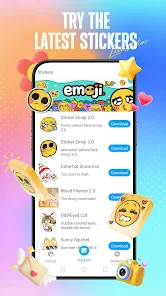

AImoji – AI Sticker Studio is a creative Android app that turns photos and prompts into expressive stickers and emojis. It mixes intelligent image processing with intuitive editing tools so users can build unique sticker packs for messaging, social posts, or personal projects in minutes.
AImoji – AI Sticker Studio streamlines sticker creation by combining automated background removal, stylized rendering, and manual touch-ups. Whether you want cartoonish avatars, glossy reaction stickers, or themed pack collections, the app provides a guided workflow that reduces technical barriers while offering artistic control.
Start by importing a photo or generating a concept from a text prompt. The app runs automated segmentation to separate foreground subjects, then offers style presets and manual controls to modify appearance. Use the editor to refine contours, add outlines or shadows, and finalize a sticker sheet. Finally, group selections into a pack and choose export settings for instant sharing.
AImoji – AI Sticker Studio balances automation with hands-on customization. You can toggle between simple one-tap transformations and detailed editing modes. Adjustable parameters include edge smoothing, stroke thickness, color palettes, and filter intensity. Layer controls let you position text and graphic overlays precisely, while opacity sliders and blend modes help you craft depth and cohesion across sticker elements.
The app supports common file formats like PNG and WEBP, with options to export transparent stickers or compressed packs optimized for messaging apps. AImoji also offers direct integration features for popular chat platforms and social networks, allowing users to add sticker packs to their account or save directly into device galleries. Export settings include size presets for mobile chats, stories, and high-quality prints.
Designed for Android devices, AImoji – AI Sticker Studio leverages on-device processing to keep operations fast and private. Lightweight models handle segmentation and stylization without excessive battery drain. The app scales across mid-range and flagship phones, and includes an option to defer heavy processing to cloud services for older devices. Memory-friendly caching and a responsive interface ensure smooth editing even with multiple layers.
User images remain private by default: on-device transformations are the standard, and cloud uploads occur only with explicit consent. The app provides transparent settings for data handling and lets users manage saved packs and temporary caches easily. There are safeguards against generating harmful or explicit imagery, and moderation tools help maintain a positive creative environment.
After installing AImoji – AI Sticker Studio, begin by granting access to your photos. Import an image, choose a preset, and apply quick edits. Save the result as a single sticker or add multiple variations to a pack. The onboarding tips and template library provide inspiration and accelerate the learning curve for new users.
Use high-contrast photos for cleaner subject separation, experiment with stroke and shadow settings to increase legibility on small screens, and build themed packs (moods, characters, reactions) to give your collection identity. Regularly clear the cache to maintain performance when working with dozens of images.
AImoji – AI Sticker Studio is a practical tool for anyone who wants to create polished, shareable stickers without professional design skills. With a mix of automated assistance and detailed controls, it adapts to casual users and creators seeking fast, attractive results.




Dubai Burj Khalifa Wallpapers
4.40.00MB

Dragon Ultra Edition Wallpaper
4.442.00MB

Wallora - Wallpapers
4.314.00MB

MOD Bussid Terbaru Artis 2026
4.523.00MB

Cài Hình Nền Động Phật Giáo
4.052.00MB
Supercar Neon Wallpaper 4K
4.08.00MB

Peaky Blinders Wallpaper 4K
4.310.20MB

Lynix: AI Photo & Video Maker
4.363.00MB