Digital Planner: Smart Journal
Version: 1.0.0.0
66.00MB
4.2
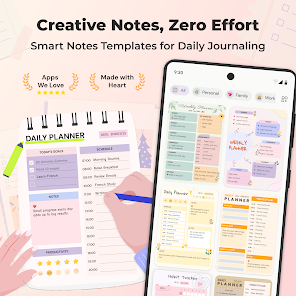
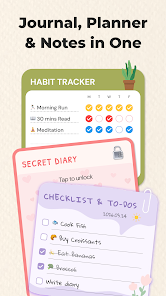

Digital Planner: Smart Journal is an all-in-one daily planner and journal app that brings calendar, lists and private notes together in a single, calm workspace. The app balances a clean, editor-style layout with practical features so you can plan days, capture ideas, and record reflections without having to switch between multiple tools. Whether you prefer a paper-like page or a compact checklist, Digital Planner: Smart Journal offers a familiar, touch-first editing area where entries, photos and receipts are kept alongside reminders and habit data.
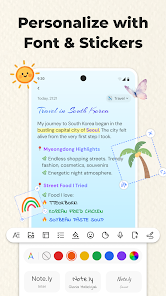
The interface relies on simple, predictable gestures: tap to add a page, long-press to reorder sections, drag templates into a notebook and swipe items to mark tasks complete. Checklists support nested subtasks and recurring schedules so routine items can be automated without a separate workflow. Rich editing allows inline text styles, image inserts, stickers and colored backgrounds to make pages feel like real stationery, and standard undo/redo helps recover quick edits. These controls are designed to be responsive on phones and tablets and to feel natural for both quick captures and longer journal entries.
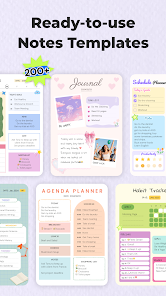
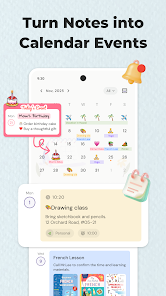
Digital Planner: Smart Journal organizes content into notebooks, pages and dated entries, which creates a clear level structure similar to physical planners. A linked calendar view shows entries and reminders for specific days while list views surface tasks across weeks. Templates form the building blocks of this structure: daily layouts, weekly overviews, meal planners, travel checklists and finance pages can be applied to new pages or saved to a personal template library so repeated workflows become a single-tap operation. This approach keeps structure flexible without forcing a single methodology.
Progression in the app is focused on habit building and small, measurable goals rather than competition. Built-in habit trackers provide streak indicators, progress bars and completion percentages so you can monitor momentum over days and weeks. Weekly and monthly summaries aggregate completed tasks and habit performance to reveal trends and milestones; these provide gentle challenges like maintaining a streak or improving completion rates over time. There are no public leaderboards or multiplayer mechanics—progress is private and intended to support personal development.
The app emphasizes customization so your planner reflects your style and practical needs. Choose from over 200 templates, adjust color palettes, change fonts and resize text to suit reading comfort. Add stickers, photos or patterned backgrounds to pages to create visual variety, or keep layouts minimal with plain text for focused capture. Modified pages can be saved as new templates and organized in folders to support different projects—study, work, personal finance or travel—without losing an aesthetic or functional identity.
Replay value comes from repeatable routines and adaptable templates: daily check-ins, recurring habit tracking and reusable layouts encourage return visits, while the combination of quick-capture notes and full-page journaling supports different moods and tasks. Over time your template library and archived pages create a record of decisions and reflections that can be repurposed for future projects. Regular use rewards you with clearer routines, reusable setups and a searchable archive that reduces setup time when new plans begin.
User experience focuses on clarity and accessibility: guided onboarding prompts introduce core features and sample templates so you can start planning immediately, and accessibility options include adjustable text sizes, high-contrast palettes and standard screen-reader compatibility for primary reading and navigation. The app is designed to work offline-first—local edits save instantly and background sync updates cloud copies when connectivity returns—so you can rely on the planner while traveling or in low-coverage areas.
Export and import use standard formats: pages and notebooks can be exported as PDFs or images for printing or archiving without vendor lock-in. Privacy controls let you lock selected pages locally on your device to keep sensitive writing secure. The app focuses on single-user planning and private journaling and does not offer real-time collaborative editing, so it is not intended to replace team planning software. For individuals who want a visually oriented, private planner with dependable offline access, Digital Planner: Smart Journal provides a flexible, long-term tool for planning, tracking and reflecting.