Encrypted Notebook
Version: 1.0
10.00MB
4
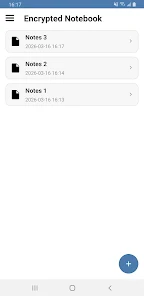
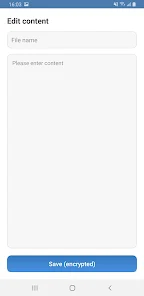
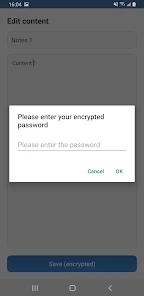
Encrypted Notebook is a lightweight, privacy-first note-taking app that encrypts every file on your device so sensitive information never leaves your phone or tablet. This secure editor uses AES-based encryption and requires a password to open existing notes, giving you a simple, offline-first way to keep diaries, reminders, or any confidential text under local control. The interface is intentionally minimal so you can focus on writing, and the app automatically reapplies the original password when you save changes to a file you opened for editing.
The core protection is AES encryption for each saved file, meaning every note is stored in an encrypted container in local storage and decrypted only after you enter the correct password. Files are never uploaded or synced to a server, which reduces exposure to online attacks and keeps your data available even when you are offline. Basic file operations are straightforward: create a new encrypted file, open an existing file by entering its password, edit the content in the distraction-free editor, and save to replace the previous encrypted copy. Files are listed and sorted by last modified time so the notes you’ve worked on most recently appear first.
Encrypted Notebook is designed to be familiar to Android users: tap a file to open it, use the on-screen keyboard to edit, and use the system back and save actions to exit and persist changes. When you open a file the app prompts for the password once and then automatically reuses that password while you remain in the editing session to make saving quick and predictable. Renaming and basic file management are handled with simple gestures and context actions; the goal is to keep controls intuitive without requiring extensive menus. The editor supports plain text entry with a clean layout that removes distractions when you write.
Notes in Encrypted Notebook are organized simply by modification time so your most recent work stays accessible. This creates a natural progression: start a new entry, return later to update it, and the item will move to the top of the list when you save. That simple chronological structure works well for diaries, to-do notes, or any content that evolves over time. Because the app focuses on local storage and single-device use, progression is based on manual management of files on your device rather than automated cloud synchronization or version histories.
The visual approach favors clarity: an uncluttered editor area, readable typography, and a compact file list ensure the app is comfortable for sustained writing or quick notes. Encrypted Notebook follows standard Android theming and accessibility settings so text scaling and contrast adjustments provided by the operating system are respected. The result is a consistent, distraction-free environment that adapts to your device preferences without overwhelming you with options.
Because all storage is local, the app works reliably without a network connection and is compatible with Android accessibility services such as screen readers and system font size controls. This offline-first behavior means you can access and edit your encrypted notes whether or not you have signal. It also reduces external dependencies, an important consideration for users who prioritize privacy and control over their information.
There are important limitations to consider. Encrypted Notebook does not provide cloud sync or automatic remote backup, so if you lose your device or its storage is erased without a separate backup, encrypted notes may be irretrievable. Access to a note depends entirely on the password you set: forgetting the password will most likely prevent decryption of existing files. Because of these trade-offs, the app places responsibility for backups and password management on the user; consider exporting an encrypted copy to external storage or maintaining a secure password record if recovery is important.
Overall, Encrypted Notebook offers a straightforward, privacy-oriented alternative to cloud-based note apps: strong on-device encryption, a minimal editor for focused writing, clear file organization by recency, and offline reliability suited to private diaries, sensitive reminders, and other confidential text that you want to keep under your own control.