
Captions & Tags: Copy Paste
Version: 1.0.1
41.00MB
4.2

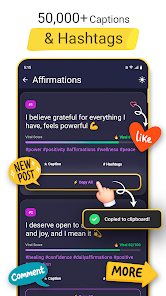
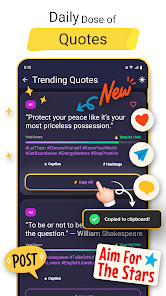



Captions & Tags: Copy Paste helps users quickly find and reuse ready-made captions, hashtags and short text snippets for social posts, stories and messages. The app organizes content by topic and mood, lets you copy with a tap, and speeds up caption creation for Instagram, TikTok, Twitter and more.
Captions & Tags: Copy Paste is a utility designed to remove friction from social posting. Instead of drafting captions from scratch or hunting for trending tags, you browse curated collections, select what fits your post, and copy it directly to the clipboard. The library covers categories such as travel, quotes, fashion, fitness, food and seasonal themes.
The interface focuses on simple navigation and minimal taps. A clean grid or list view lets you preview caption text and estimated tag counts. Use the search bar to narrow results by keyword or emoji, and apply filters for length or tone. Quick-preview modes show how a caption might read with common emojis, line breaks or simple formatting so you can adjust for platform style.
While the app provides a large base of ready-made content, it also supports personalization. Create custom collections for recurring themes like brand promotions, event announcements or recurring hashtags. Rename items, combine multiple captions into one clipboard entry, and reorder favorite lists to match your posting habits.
Freelancers, small business owners and social media managers will find the app useful for maintaining consistent voice across accounts. Use it to draft promotional copy, craft calls to action, or assemble hashtag stacks tailored to niche audiences. Teams can standardize message templates for product launches, sales, or community engagement, keeping posts aligned without repeated drafting.
The app is optimized to run smoothly on a wide range of Android devices. Lightweight caching improves load times, and a low-memory footprint keeps background usage minimal. Clipboard interactions are fast and responsive, and compatibility with newer Android versions ensures reliable copy-paste behavior across popular social platforms.
Captions & Tags: Copy Paste focuses on local storage for personal libraries and favorites. The app requests minimal permissions needed to access storage and the clipboard. Review the settings to control sync options or cloud backups; these are optional and can be disabled if you prefer to keep content strictly on your device.
After installation, explore the suggested categories and mark a few favorites to populate your quick-access list. Try copying a caption and pasting it into a draft post to check spacing and line breaks. Adjust or combine entries as needed, then rely on your curated library to speed up daily posting tasks.
Anyone who posts frequently on social networks will appreciate the time savings. From casual users wanting fun, ready-to-use captions to professionals managing multiple accounts, this tool reduces repetitive typing and helps maintain a consistent tone.
With its simple approach to organizing and copying text, Captions & Tags: Copy Paste offers a practical way to streamline caption creation and manage hashtags for faster, more consistent social media publishing.