Easy File Transfer
Version: 1.0.3
26.81MB
4
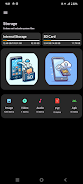
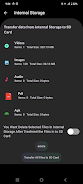
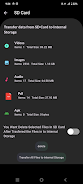
Easy File Transfer is a lightweight Android utility that moves files between devices quickly and securely. Designed for users who need fast, Wi-Fi-based sharing without cables, it simplifies bulk transfers, folder syncing, and cross-platform exchanges while keeping a minimal interface and straightforward setup.
At its core, Easy File Transfer focuses on one goal: move data reliably and fast. It supports device-to-device transfers over the local network, establishes point-to-point connections, and can bridge transfers to desktop machines via a browser-based receiver. The app handles photos, videos, documents, and APKs with no complicated permissions or cloud dependency.
To start a transfer, open Easy File Transfer, choose send or receive, and pick the files or folders. The recipient device is discovered automatically when both devices are on the same network. For devices that cannot auto-discover, a QR code or short code can be used to establish a secure session. Transfer progress is shown with clear speed and ETA indicators so you know when operations will finish.
Performance depends on your local network, but the app leverages Wi-Fi bandwidth to maximize throughput. It avoids mobile data unless explicitly allowed. For privacy, sessions are temporary and transfers are direct; files are not uploaded to third-party servers. Optional password protection and automatic session expiration add extra safeguards for sensitive content.
The interface emphasizes clarity. Primary actions are large and accessible. File browsing uses the familiar folder metaphor, so users who manage storage on Android will feel at home. The notification system keeps transfers visible while you switch apps, and completed operations are archived in a transfer history for quick re-sends.
Place both devices on the same Wi-Fi network or use a Wi-Fi hotspot for the best results. When moving many small files, bundle them into a single folder or compress them first to reduce handshake overhead. If you hit discovery issues, use the app’s manual code entry to bypass automatic detection. For frequent transfers, pin the app to Quick Settings or create a homescreen shortcut for one-tap access.
High-speed transfers can consume battery quickly. Keep devices plugged in for very large operations, or enable the app’s low-power transfer mode to balance speed and longevity. The app is optimized to minimize CPU load, preserving responsiveness for other tasks while transfers run in the background.
Easy File Transfer appeals to people who want a simple, dependable tool without cloud subscriptions or account setup. Tech-savvy users appreciate the control over transfer parameters and privacy, while casual users like the straightforward send/receive flow. It’s a practical solution for moving photos between phones, backing up documents to a laptop, or sharing APKs during development and testing.
Install the app, grant necessary local storage permissions, and follow the first-run wizard to set up preferences. Most users are ready to transfer in under a minute. Keep the app updated to benefit from ongoing performance improvements and new connection options like Bluetooth fallback and enhanced resume logic.
Easy File Transfer balances utility and simplicity. It’s a focused tool for anyone who regularly moves files between devices and values speed, privacy, and a minimal learning curve.