MentorMe
Version: 2.0.0
113.98MB
4.4





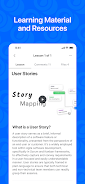

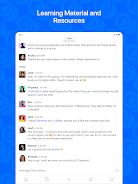
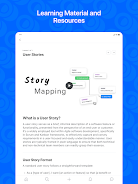

MentorMe is a mobile productivity app designed to connect users with curated mentors, track development goals, and deliver bite-sized learning. It blends scheduling, personalized lesson plans, and progress metrics into a compact interface, helping professionals accelerate skills without juggling multiple platforms or spreadsheets.
MentorMe centralizes mentorship workflows by combining communication, goal-setting, and content delivery. The app targets busy learners who want guided improvement: you can schedule sessions, receive tailored exercises, and monitor outcomes through a simple dashboard that highlights strengths and gaps.
The architecture of MentorMe focuses on short feedback loops. After a quick onboarding assessment, the app proposes a set of weekly targets and suggests mentor matches. Mentors and learners exchange structured session agendas, record action items, and tag follow-up tasks. Each completed task feeds into the app’s analytics engine to refine future recommendations.
Sessions follow a predictable cycle: prepare, meet, apply, review. Preparation tools let mentors share prompts or materials ahead of time. During live video or chat sessions, both parties can pin notes. Post-session checklists convert discussion points into measurable actions, closing the loop and improving retention.
MentorMe prioritizes clarity and speed. The interface uses clear typography and modular cards so you can see upcoming commitments and recent achievements at a glance. Load times and navigation feel responsive even with dozens of active plans. Notifications are configurable to reduce interruptions while keeping critical reminders visible.
Although optimized for individual learners, MentorMe scales to small teams. Managers can assign learning tracks, monitor aggregate progress, and align mentorship outcomes with quarterly goals. The app also supports peer-to-peer coaching where teammates can exchange feedback and share best practices directly within the platform.
Professionals appreciate MentorMe for its practical orientation: it reduces administrative overhead and makes mentorship outcomes tangible. The app’s analytics gives clear evidence of development, which helps in performance reviews and career planning. Mentors value the structured session templates that streamline preparation and follow-up.
MentorMe supports single sign-on options and standard encryption for messages and stored materials. Integrations with calendar apps and cloud storage simplify file sharing and scheduling. Export features let users compile reports for HR or personal archives.
To begin, create a profile, complete a short skills assessment, and select a mentorship focus. The app walks you through matching with mentors and setting your first milestones. New users will find that an initial 30-minute setup yields a clear learning path and immediate tasks to act on.
Whether you’re aiming to level up technical skills, prepare for promotion, or build leadership habits, MentorMe acts as the practical hub that keeps mentoring structured, measurable, and time-efficient. Try a focused two-week plan to evaluate how mentorship integrated into your routine changes daily habits and results.