ImportCalc Pro
Version: 2.5.0
14.00MB
4.4

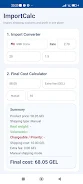


ImportCalc Pro simplifies international shipping costs and customs duty calculations for small businesses and logistics professionals. The app consolidates tariffs, taxes, freight, and insurance into a single landed-cost estimate, providing clear breakdowns and exportable reports ideal for invoicing, quoting, and compliance checks.
ImportCalc Pro is a focused utility designed to remove guesswork from cross-border pricing. It combines up-to-date tariff lookups with customizable cost inputs so users can model scenarios quickly. For finance teams, procurement officers, and freight forwarders, the app reduces manual spreadsheets and improves consistency when calculating total landed cost.
At its core, ImportCalc Pro translates complex customs rules into actionable numbers. It supports multiple currencies and tax regimes, offers line-item analysis, and produces printable cost summaries. The interface emphasizes clarity: each cost component is labeled, and the final margin-ready figure is presented alongside a transparent breakdown.
ImportCalc Pro integrates with common business workflows. You can import product lists, reuse saved templates, or export results to share with colleagues. The app is designed to slot into existing quoting processes without forcing teams to change their primary systems.
The app layout uses straightforward input fields and step-by-step forms. New users will find the main calculator screen intuitive: enter product value and dimensions, choose a transport mode, then add handling or compliance fees. Visual cues highlight missing data points so calculations don’t proceed with accidental blanks.
Performance focuses on responsiveness rather than flashy visuals. Calculations are instant for standard shipments, and bulk imports process quickly. The app is optimized for battery life and offline access to previously downloaded tariff datasets, which is useful in areas with intermittent connectivity.
One strength of ImportCalc Pro is its flexibility. Administrators can lock or expose fields to align with company policy, set default currencies and units of measure, and create role-based templates. That control helps maintain accuracy across teams and prevents accidental overwrites of essential settings.
Reports include a line-item ledger showing how each fee influences the final landed cost. Users can annotate entries for audit trails or attach supporting files to validate special charges. Customizable headers and company logos make the exported PDF or CSV look professional for client-facing quotes.
Setup requires only a few steps: set your home currency, import product SKUs if available, and download tariff tables for primary trading partners. After that, enter a sample shipment and review the generated breakdown to confirm defaults. Most users can run accurate quotes within minutes.
ImportCalc Pro is built for accuracy and repeatability. It streamlines the technical parts of freight costing so teams can focus on negotiations and margins rather than manual calculations. For companies that manage frequent cross-border shipments, the app becomes a practical daily tool for faster, consistent pricing.