AirConsole
Version: 2.8.16
8.70MB
4
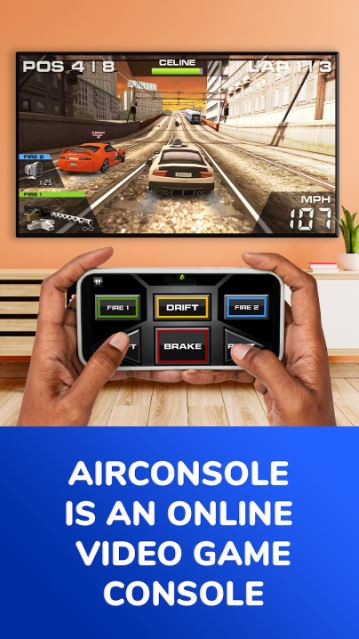
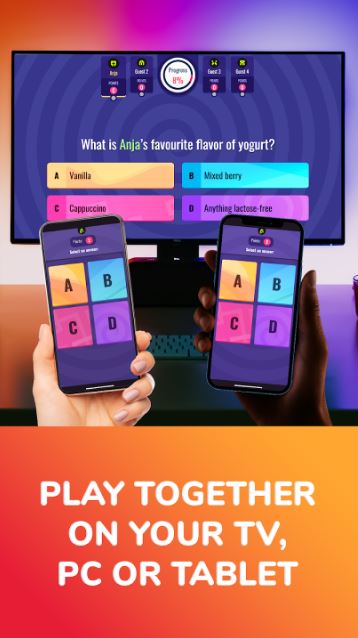
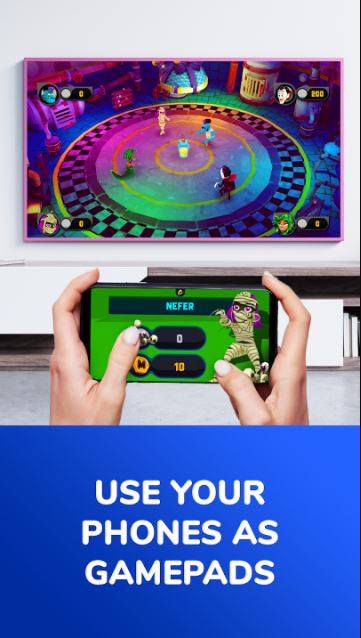
AirConsole turns a computer, tablet or smart TV into a party-ready console while your phones become the controllers. AirConsole is designed to make group entertainment fast and fuss-free, giving hosts and players a low-friction way to start shared-screen sessions in living rooms, classrooms and informal team events without buying extra hardware. The app focuses on short, social games and a straightforward hosting flow so groups can join in minutes and concentrate on playing together rather than configuring equipment.
The core feature set centers on multi-device hosting and simple joining: a single host runs the session on a computer, tablet or smart TV and nearby players connect with a browser or the mobile interface on their phones. A free Starter Pack rotates weekly selections of games that give newcomers a taste of the library with support for small groups and ad-supported breaks. A paid Hero subscription removes ads for the whole session, unlocks the wider game catalog, and grants exclusive in-game content and early access where available. AirConsole also offers flexible session controls for the host so rounds, team settings and player slots can be adjusted on the fly to suit the size and pace of your gathering.
Most titles are designed as fast rounds or mini-game collections that fit a party setting: think short challenges, head-to-head duels, trivia, drawing games, and simple sport or racing mechanics. Controls are intentionally lightweight and use the smartphone as a controller: virtual buttons, tilt and swipe gestures, and on-screen sliders are common, so players can jump in without learning complex inputs. Many games emphasize quick reflexes, strategic timing, or cooperative tasks that are resolved within a few minutes, which keeps sessions energetic and easy to rotate through players or game modes.
Replayability comes from a mix of short-session design, variable difficulty or rule variants inside individual games, and a broad rotating catalog that encourages trying different genres and play styles. Within a session, most games use round-based scoring, bonus rounds or cumulative tallies to create light progression and immediate feedback. The Hero subscription expands long-term play by unlocking additional games and cosmetic options that personalize the experience, while weekly Starter Pack changes ensure there’s always fresh content to sample without committing to a subscription.
The available games span several visual approaches, from minimalist vector art to colorful, cartoon-like interfaces that are easy to read on a shared living-room screen. Level structure tends to favor short, discrete encounters rather than long continuous stages, which supports quick resets between players and clear victory conditions. On the host display, menus and in-game prompts are optimized for visibility at a distance so everyone watching the screen can follow scoring, timers and player status without needing to crowd around the device.
Customization varies by game but commonly includes avatar selection, color choices to identify players, and selectable control sensitivity for tilt- or motion-based inputs. Accessibility options differ across titles; many offer simplified control schemes, adjustable difficulty settings and basic audio/visual toggles to accommodate diverse players. Because the platform uses familiar phone interactions, it lowers the barrier for participants who may be less experienced with gaming while still providing challenge settings for more competitive groups.
Getting started is straightforward: the host launches a session on the chosen display, shares the session code or connection prompt, and players open the controller page on their phones to join. The host interface provides session management tools to add or remove players, switch games, and control timing. AirConsole’s Hero subscription model is billed to the paying user but is designed so the subscription benefits apply to all players within the same active session, which simplifies access in group settings. The free Starter Pack lets you try the system and understand the flow before deciding whether to upgrade.
AirConsole is primarily focused on local, shared-screen gatherings, and many games are optimized for in-room play; however, exact offline capabilities and performance depend on the host device and network setup. Some host platforms or browser environments may limit the available titles or affect responsiveness, so experience can vary between a modern computer, a tablet or a smart TV. Regular updates may add or rotate games, and the availability of specific content can change over time based on platform support.
There are a few trade-offs to be aware of: the free Starter Pack is limited in player count and includes ad breaks, which can interrupt flow for casual users. Game availability and performance can differ across host devices and operating environments, meaning that a title that runs smoothly on a laptop might behave differently on some smart TVs. Full, uninterrupted access to the entire game library requires a Hero subscription, which may not suit occasional players who prefer pay-as-you-go arrangements.
Overall, AirConsole provides a practical, low-cost local multiplayer experience that emphasizes accessibility and quick social gaming sessions. Whether you want a lightweight solution for family game night, an engaging classroom activity, or a simple team-building exercise, AirConsole’s mix of short games, phone-based controls and simple session management make it a convenient option to try before investing in additional hardware.